Notes on Running Application Advisor Against a build.gradle That Uses fileTree
· 24 min read
A build.gradle written in an air-gapped environment tends to have some peculiar traits, and it needs some preparation before Application Advisor can work with it.
This time, the example is a build that uses fileTree.
Introduction
As I introduced in these posts, Application Advisor is a tool for keeping Java (not just Spring) continuously up to date.
https://notes.lespaulstudioplus.info/posts/50 https://notes.lespaulstudioplus.info/posts/51
Once Application Advisor is up and running, it is a great help in modernizing applications, but the very first loop can turn out to be harder than you might expect.
In this post, I introduce a technique for running Application Advisor against one such case: "a build.gradle that uses fileTree".
What is "a build.gradle that uses fileTree"?
In short, it is a build.gradle like this.
dependencies {
    implementation fileTree(dir: 'lib', include: ['*.jar'])
}
This is a style often seen in environments, such as air-gapped networks, where there is no repository hosting jar files on the network. It has the following characteristics:
- It uses
fileTreeto read the dependency libraries from a directory calledlib/on the local file system - The jar files placed in
lib/are defined with the wildcard'*.jar'(or sometimes each file is listed individually)
Gradle compiles this without any problem.
However, a jar loaded through fileTree is just a file path in Gradle's dependency graph, and has no group / artifact / version.
So, as it stands, Application Advisor cannot list the dependencies that should be upgraded at the advisor build-config get or advisor upgrade-plan get stage, and even if you run it, you only get a half-finished result.
To get past this, build.gradle needs to be fixed with the following steps:
- Remove
fileTreefrom build.gradle - Prepare a remote Maven repository and run Application Advisor
I will walk through this flow below.
Note that fileTree is specific to Gradle, so this does not apply if you are using Maven.
That said, Maven also has its own air-gap-specific styles, which I plan to write about in a future post.
Removing fileTree from build.gradle
As long as fileTree is used, Application Advisor cannot understand the identifiers of the dependencies.
You need to derive the GAV (group, artifact, version) to declare from each jar file in lib and list them all.
Done mechanically, the flow is as follows:
- If the jar file contains
META-INF/maven/<group>/<artifact>/pom.properties, derive the GAV from that file - If not (jars built by something other than Maven, such as Spring and Spring Boot, which are built with Gradle), compute it by matching the jar's SHA-1 against Maven Central
Note that the latter has to be run on a machine that can access Maven Central.
First, the following script looks for pom.properties and reads it.
Let's call the script ./jar-coords.sh.
#!/usr/bin/env bash
# Print group:artifact:version for every jar in a folder, the first step of
# turning a `fileTree(dir: 'lib')` build into one coordinate per jar. Needs no
# network, so it runs inside the air-gapped site.
#
#   1. Maven writes META-INF/maven/<group>/<artifact>/pom.properties into every
#      jar it builds; read it. A shaded jar carries several, so prefer the one
#      whose artifactId matches the file name.
#   2. Jars not built by Maven (Spring and Boot use Gradle; Tomcat and Lombok
#      use Ant) have none. They are printed as "?? <jar> sha1=<hash>" for
#      sha1-lookup.sh to resolve.
#
# flatDir finds a jar only by <artifactId>-<version>.jar, so a coordinate whose
# jar is named otherwise gets a "# RENAME" note.
set -euo pipefail
dir=${1:-lib}
for j in "$dir"/*.jar; do
  f=$(basename "$j")
  props=$(unzip -Z1 "$j" 2>/dev/null | grep -E '^META-INF/maven/[^/]+/[^/]+/pom\.properties$' || true)
  best=""
  for p in $props; do
    [[ $f == "$(cut -d/ -f4 <<< "$p")-"* ]] && best=$p && break
  done
  [[ -z $best ]] && best=$(head -1 <<< "$props")
  if [[ -n $best ]]; then
    unzip -p "$j" "$best" | tr -d '\r' | awk -F= -v f="$f" '
      /^groupId=/ {g = $2} /^artifactId=/ {a = $2} /^version=/ {v = $2}
      END {print g ":" a ":" v (f == a "-" v ".jar" ? "" : "   # RENAME to " a "-" v ".jar")}'
  else
    echo "?? $f sha1=$(shasum "$j" | cut -d' ' -f1)"
  fi
done | sort
Run it, for example, like this (it works without internet access):
./jar-coords.sh lib > coords.txt
It prints the dependencies it could resolve, as shown below, and jar files that had no pom.properties are printed with a leading "??".
?? spring-boot-2.7.2.jar sha1=a471deae9d806afa28ab888f75d46cff6e2f118c
org.apache.logging.log4j:log4j-api:2.17.2
Next, prepare a script like the following. It looks up the GAV of the dependency from its SHA-1 value.
Let's call the file ./sha1-lookup.sh.
#!/usr/bin/env bash
# Resolve the "?? <jar> sha1=<hash>" lines jar-coords.sh prints, by asking
# Maven Central which artifact has that SHA-1. Run it on a machine WITH network
# access; only file names and hashes leave the site.
#
#   grep '^??' coords.txt | ./sha1-lookup.sh
#
# A jar Central does not know is internal or patched: give it a coordinate of
# your own and name the file to match.
set -euo pipefail
while read -r _ jar sha; do
  sha=${sha#sha1=}
  id=$(curl -sSf "https://search.maven.org/solrsearch/select?q=1:$sha&wt=json" \
    | python3 -c 'import sys, json; d = json.load(sys.stdin)["response"]["docs"]; print(d[0]["id"] if d else "")')
  echo "${id:-?? $jar not on Central}"
done
Then run it as follows to get the GAV values (this requires access to Maven Central):
grep '^??' coords.txt | ./sha1-lookup.sh
As a result, you get values like this:
org.springframework.boot:spring-boot:2.7.2
Note that search.maven.org/solrsearch is Maven Central's legacy search API (it is being migrated to central.sonatype.com), and its responses can be unreliable.
If it fails, wait a while and run it again.
Then rewrite build.gradle as follows.
repositories {
    flatDir {
        dirs 'lib'
    }
}

dependencies {
    implementation 'org.apache.logging.log4j:log4j-api:2.17.2'
    implementation 'org.springframework.boot:spring-boot:2.7.2'
}
The key points are:
- Instead of pointing at
lib/withfileTree, declare it as a local repository withflatDirunderrepositories - Explicitly declare, in
dependencies, every dependency found in the previous steps flatDirignores the group and looks for jars by the file name<artifactId>-<version>.jar. As far as Gradle is concerned, the build works whatever group you write, but Application Advisor identifies dependencies including their group, so you need to write the correct group
Adding the transitive = false option is also recommended.
It stops the lookup of transitive dependencies.
flatDir itself has no POMs, so transitive dependencies are not resolved through it, but if repositories that do have POMs, such as mavenLocal() or a mirror, are mixed in, Gradle starts fetching transitive dependencies that are not in lib/.
When jar files have been copied locally, usually only the bare minimum has been transferred, so if anything missing is not in lib/, the offline build fails. This option prevents that.
allprojects {
    configurations.all {
        transitive = false
    }
}
Removing fileTree from buildscript as well
It is common for not only dependencies but also the Gradle plugins themselves to be loaded through fileTree.
Normally, in an environment with network access, the old style needs just a single classpath line, as shown below.
The jars the plugin needs are resolved transitively from the plugin's POM.
buildscript {
    repositories {
        mavenCentral()
    }
    dependencies {
        classpath 'org.springframework.boot:spring-boot-gradle-plugin:2.7.2'
    }
}

apply plugin: 'java'
apply plugin: 'org.springframework.boot'
apply plugin: 'io.spring.dependency-management'
In an air-gapped environment, this sometimes turns into fileTree, like this:
buildscript {
    dependencies {
        classpath fileTree(dir: 'lib', include: ['*.jar'])
    }
}

apply plugin: 'java'
apply plugin: 'org.springframework.boot'
apply plugin: 'io.spring.dependency-management'

dependencies {
    implementation fileTree(dir: 'lib', include: ['*.jar'])
}
Gradle is fine with this too (since it is fileTree, you don't even need repositories).
However, upgrading Spring Boot also requires upgrading the Spring Boot Gradle plugin, and when the plugin's version exists only in a jar file name, Application Advisor can neither recognize it nor rewrite it.
Left as is, you end up in a half-finished state where the libraries have moved to Spring Boot 3 but the plugin is still at 2.7.
Rewrite this with GAVs as well, just like dependencies.
buildscript {
    repositories {
        flatDir { dirs 'lib' }
    }
    configurations.classpath { transitive = false }
    dependencies {
        classpath 'org.springframework.boot:spring-boot-gradle-plugin:2.7.2'
        classpath 'io.spring.gradle:dependency-management-plugin:1.0.12.RELEASE'
        classpath 'org.springframework.boot:spring-boot-loader-tools:2.7.2'
        classpath 'org.springframework:spring-core:5.3.22'
        classpath 'org.apache.commons:commons-compress:1.21'
        // ...other jars the plugins need
    }
}
The key points are:
- With
transitive = false, you have to list every jar the plugin depends on, including those that would normally be resolved transitively from its POM. To find out which jars are needed, run./gradlew buildEnvironmenton a machine with network access against a regularbuild.gradlewith the singleclasspathline allprojects { configurations.all { ... } }does not apply tobuildscript, so specifyconfigurations.classpath { transitive = false }insidebuildscript- With
classpath fileTree(dir: 'lib', include: ['*.jar']), the application's jars were also on the plugin classpath. Conversely, do not list the plugin's jars underdependencies
Confirming the baseline offline
In the end, build.gradle looks like this:
buildscript {
    repositories {
        flatDir { dirs 'lib' }
    }
    configurations.classpath { transitive = false }
    dependencies {
        classpath 'org.springframework.boot:spring-boot-gradle-plugin:2.7.2'
        classpath 'io.spring.gradle:dependency-management-plugin:1.0.12.RELEASE'
        classpath 'org.springframework.boot:spring-boot-loader-tools:2.7.2'
        classpath 'org.springframework:spring-core:5.3.22'
        classpath 'org.apache.commons:commons-compress:1.21'
        // ...other jars the plugins need
    }
}

apply plugin: 'java'
apply plugin: 'org.springframework.boot'
apply plugin: 'io.spring.dependency-management'

repositories {
    flatDir {
        dirs 'lib'
    }
}

allprojects {
    configurations.all {
        transitive = false
    }
}

dependencies {
    implementation 'org.apache.logging.log4j:log4j-api:2.17.2'
    implementation 'org.springframework.boot:spring-boot:2.7.2'
    // ...the remaining dependencies found by jar-coords.sh / sha1-lookup.sh
}
At this point, check that the build succeeds offline.
./gradlew --offline bootJar
Note that ./gradlew (the Gradle Wrapper) downloads the Gradle distribution itself on first use, so it may not be usable in an air-gapped environment.
In that case, check with a Gradle installed on the machine: gradle --offline bootJar.
With this, you have reached the baseline.
I have tried to keep the steps so far as generic as possible, but please bear in mind that, depending on how your build.gradle is written, other tweaks or adaptations may be needed.
Running Application Advisor
Once build.gradle has been fixed this far, all that's left is to run Application Advisor.
One thing to watch out for before running it: the place where Application Advisor runs must have access to a Maven repository from which the target jar files can be obtained.
It is also strongly recommended that this Maven repository be set up as a mirror of a public repository, rather than holding only the minimal assets needed for the upgrade.
From here on, we assume a Maven repository has been set up, so remove the following lines:
repositories {
    flatDir {
        dirs 'lib'
    }
}

allprojects {
    configurations.all {
        transitive = false
    }
}
Remove the flatDir and configurations.classpath { transitive = false } on the buildscript side in the same way.
Of course, if you remove all repositories, there is no repository left to search at all.
So you need to add a Maven repository.
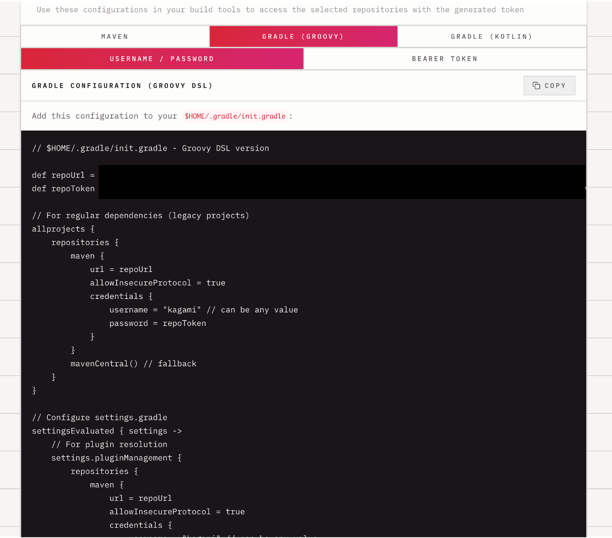
There are various ways to do this, but if you use kagami as your mirror repository, its README describes how to declare the repository in $HOME/.gradle/init.gradle, so use that as a reference.
When doing so, also check that the mirror is used by the buildscript side (Gradle plugin resolution) as well.
https://github.com/making/kagami
Removing transitive = false here means transitive dependencies start being resolved, so the dependency graph will differ from the baseline.
It is reassuring to compare the output of ./gradlew dependencies before and after.
Also, the dependencies you listed under the transitive = false assumption (things that would normally come in transitively, such as org.springframework:spring-core:5.3.22) remain in build.gradle with explicit versions.
With io.spring.dependency-management, a version written directly on a dependency takes precedence over the BOM, so even after you upgrade Spring Boot, these lines may be left behind at their old versions.
So I recommend doing one of the following when you switch to the mirror:
- Remove the dependencies that come in transitively and narrow the list down to the true direct dependencies (starters, etc.)
- Drop the version from dependencies that are managed by the BOM
At this point, confirm that the build works without --offline.
./gradlew bootJar
If this succeeds, you can now run upgrade-plan apply and patch apply.
Again, although I have made the steps generic, I expect some fine-tuning will be needed depending on how your build.gradle is written.
Summary
I wrote about how to deal with fileTree, which is a troublesome pattern for Application Advisor.