Adding Authentication to Spring gRPC with Spring Authorization Server (client_credentials Edition)
· 14 min read
I think using gRPC and Spring gRPC for microservice development is a very good choice. On top of that, if we use Spring Authorization Server, which became a standard feature of Spring Security as of Spring Framework 7, can we make gRPC even more secure? I gave it a try.
Introduction
At the time of writing, Spring gRPC provides three authentication mechanisms between server and client.
- HTTP Header
- mTLS
- OAUTH2
Among these, basic authentication + HTTP Header is by far the easiest, but since it relies on a password for the connection, it is hard to call it secure. The next one, mTLS, is also a very good option, but it requires SSL keys usable by both the server and the client. (Self-signed certificates are an option, though.) Furthermore, at the time of writing, the following two features for handling expired certificates have not been implemented yet, so it feels somewhat impractical.
Support for gRPC server TLS certificate rotation #49833
Support for gRPC client TLS certificate rotation #49831
That leaves the last option, OAUTH2. At first I thought OAUTH2 would be "the most troublesome". Using an external IDP such as OKTA is a hassle, and even for self-managed setups you need to set up keycloak, so I could never get motivated.
But then I remembered Spring Authorization Server. With this, it seems we can build an OAUTH2 setup with the same feeling as adding one more microservice to Spring.
Moreover, since a use case like gRPC is an M2M (Machine-to-Machine) use case, maybe we can authenticate with OAUTH2 alone, without using any passwords at all? That's what I set out to try.
Code
The code is here.
https://github.com/mhoshi-vm/play-w-gprc-mtls
Starting with the client_credentials Method
First, let's do it with the client_credentials method.
- The apps we prepare are GrpcServer, GrpcClient, and OauthServer
- GrpcClient authenticates against OauthServer using its own client_id and client_secret
- OauthServer hands out an access token
- GrpcClient uses that access token to access GrpcServer
- GrpcServer checks with OauthServer that the access token is valid, then responds to GrpcClient
GrpcClient                      OauthServer                     GrpcServer
    |                               |                               |
    |--(1) client_id/client_secret->|                               |
    |                               |                               |
    |<--(2) access token------------|                               |
    |                               |                               |
    |--(3) gRPC request + access token----------------------------->|
    |                               |                               |
    |                               |<--(4) validate access token---|
    |                               |                               |
    |                               |--(5) token is valid---------->|
    |                               |                               |
    |<--(6) gRPC response-------------------------------------------|
Starting the OauthServer
First, start the OauthServer.
cd oauth-server
./mvnw spring-boot:run -Dspring-boot.run.profiles=client_credentials
After startup, access http://localhost:9000/.well-known/oauth-authorization-server and if you get a response, it succeeded.
For this particular use case, you can handle it without writing a single line of code.
Just add spring-boot-starter-security-oauth2-authorization-server to your dependencies and define the following properties, and the OAuth client registration is complete.
That's one of the nice things about Spring Authorization Server.
spring.security.oauth2.authorizationserver.issuer=${AUTH_SERVER_ISSUER:http://localhost:9000}
spring.security.oauth2.authorizationserver.client.grpc.registration.client-id=grpc
spring.security.oauth2.authorizationserver.client.grpc.registration.client-secret={noop}${CLIENT_SECRET:grpc}
spring.security.oauth2.authorizationserver.client.grpc.registration.client-authentication-methods=client_secret_basic
spring.security.oauth2.authorizationserver.client.grpc.registration.authorization-grant-types=client_credentials
spring.security.oauth2.authorizationserver.client.grpc.registration.redirect-uris=localhost:8080,localhost:8081
spring.security.oauth2.authorizationserver.client.grpc.registration.scopes=grpc:invoke
Now, in these properties, client-secret is effectively a password, but let's move on for now.
Starting the GrpcServer
Start the gRPC server. (Compiling at least once is required.)
cd server
./mvnw compile
./mvnw spring-boot:run -Dspring-boot.run.profiles=oauth
The server itself is nothing special, but the following property points it at the oauthserver we started earlier.
spring.security.oauth2.resourceserver.jwt.issuer-uri=http://localhost:9000
Starting the GrpcClient
Start the gRPC client. (Compiling at least once is required.)
cd client
./mvnw compile
./mvnw spring-boot:run -Dspring-boot.run.profiles=oauth_client_credentials
This profile loads ClientCredentialsConfigurations.java, which is basically just the code from the official documentation pasted as-is.
The properties file has the following settings. These are also for integrating with the OauthServer.
spring.security.oauth2.client.provider.my-auth-server.issuer-uri=${AUTH_SERVER_ISSUER:http://localhost:9000}
spring.security.oauth2.client.registration.grpc-client.provider=my-auth-server
spring.security.oauth2.client.registration.grpc-client.client-id=grpc
spring.security.oauth2.client.registration.grpc-client.client-secret=grpc
spring.security.oauth2.client.registration.grpc-client.authorization-grant-type=client_credentials
spring.security.oauth2.client.registration.grpc-client.scope=grpc:invoke
Running gRPC
After that, run the following command.
curl localhost:8081
If the following is printed in the client's prompt, the gRPC call succeeded.
message: "Hello ==> hello"
If you look at the gRPC server's logs, you should see something like the following.
2026-07-16T11:56:33.377+09:00 DEBUG 65425 --- [server] [-worker-ELG-3-1] io.grpc.netty.NettyServerHandler         : [id: 0xa5b7af73, L:/127.0.0.1:9090 - R:/127.0.0.1:61960] INBOUND HEADERS: streamId=3 headers=GrpcHttp2RequestHeaders[:path: /Simple/SayHello, :authority: 0.0.0.0:9090, :method: POST, :scheme: http, te: trailers, content-type: application/grpc, user-agent: grpc-java-netty/1.80.0,
authorization: Bearer eyJraWQiOiJjMzAzMTRjNi03M2E1LTRmZGMtOWJmOC1iZDFlNTczNGJhN2IiLCJhbGciOiJSUzI1NiJ9.eyJzdWIiOiJncnBjIiwiYXVkIjoiZ3JwYyIsIm5iZiI6MTc4NDE3MDU5Mywic2NvcGUiOlsiZ3JwYzppbnZva2UiXSwiaXNzIjoiaHR0cDovL2xvY2FsaG9zdDo5MDAwIiwiZXhwIjoxNzg0MTcwODkzLCJpYXQiOjE3ODQxNzA1OTMsImp0aSI6IjY4NzBjODA4LTdkOWQtNDBjMS1iZWVjLTNmNGE1YmEzZmNjNCJ9.FPE3D9AECEtheykXTjWVPhW-BH5kMoCTlMyjvwPsSG0NhkGwK18YQIYG2x4mMJ0mXLlAaZybj9Wv2L35zFnYG8UesXt2Lrt033lduWgO7U8PyU7wfh53_6aCCxlpvISE95NzgchxJ0SXRQbhK1AHV-Hq_TbVFBlmWKAgFOFLHwOnAQ4lpiXSdPBwc-c0u49O87Oo-ax2Iygo9bZ5veIpNrD9rrQhiv75PX3UBxO3puB0nx7qgw0itJBgX_2SjJ-uzBfEK767J1OWGf6FZeISmbweqPihjp1uOSJkRk9wcIBukk_BeqkWRdxhBuqnya1FRC26kfdyIHwAJTODIz_-QA, grpc-accept-encoding: gzip] padding=0 endStream=false
The part after Bearer is the JWT token, and if you inspect it with a JWT token decoder you can confirm that it was issued by the OauthServer.
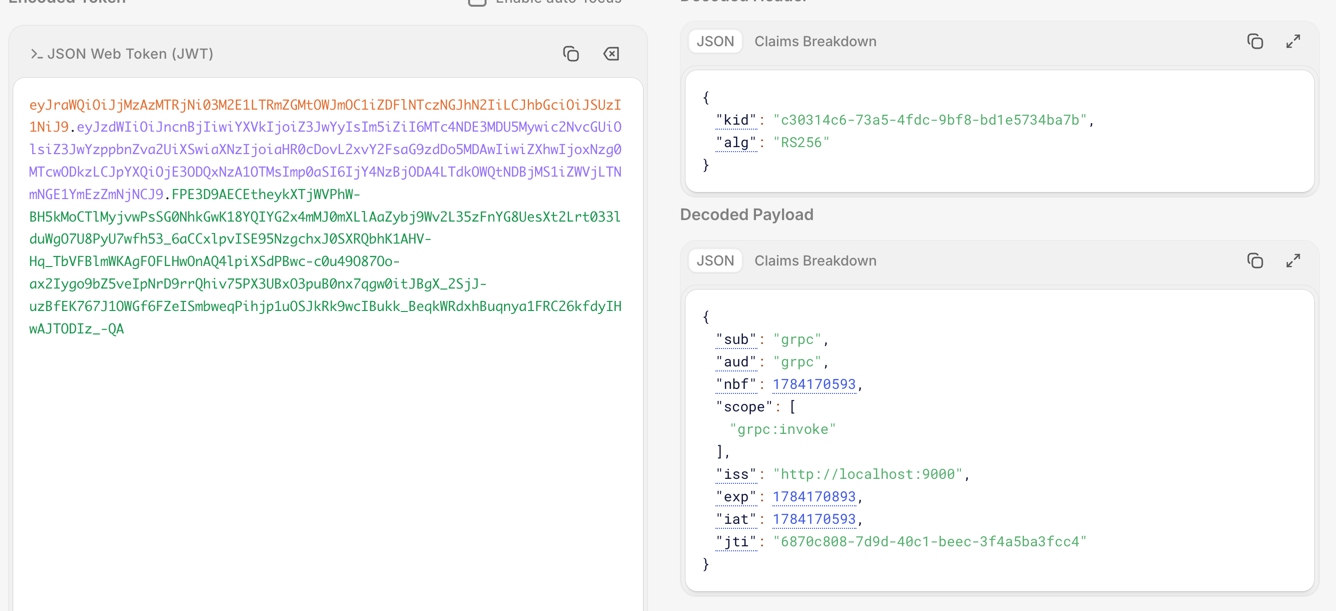
Also, for example, if you intentionally set spring.security.oauth2.client.registration.grpc-client.client-secret=grpc to something different, you can confirm that it results in an authentication error like the following.
2026-07-16T12:26:47.593+09:00 ERROR 79948 --- [client] [nio-8081-exec-1] o.a.c.c.C.[.[.[/].[dispatcherServlet] : Servlet.service() for servlet [dispatcherServlet] in context with path [] threw exception [Request processing failed: org.springframework.security.oauth2.core.OAuth2AuthorizationException: [invalid_token_response] An error occurred while attempting to retrieve the OAuth 2.0 Access Token Response: 401 Unauthorized on POST request for "http://localhost:9000/oauth2/token": "{"error":"invalid_client"}"] with root cause
So, we were able to implement gRPC authentication like this. Even at this stage, I think it's great how simple the implementation was.
However, in this example, spring.security.oauth2.client.registration.grpc-client.client-secret is effectively treated as a password,
and if this information leaks, gRPC could be executed from unintended servers.
There are various ways to make this itself one step more secure, but it is also possible to go completely passwordless in the first place.
I'll cover that in the next entry.
Conclusion
Combining Spring gRPC with Spring Authorization Server made gRPC authentication a breeze.