Learning Horizontal Pod Autoscaler with Wavefront Part-3
· 8 min read
This is the third installment of the Learning Horizontal Pod Autoscaler with Wavefront series.
Series
Part 1 : Overview
Part 2 : Scaling from Wavefront data
Part 3 : Implementing a serverless look-alike ← you are here
Introduction
As covered in the previous background knowledge, Kubernetes supports three APIs for HPA.
Among them, Wavefront supports highly flexible metric definitions using external.metrics.k8s.io.
More detail here:
The point: you can effectively use any Wavefront metric for HPA, freely. This time we use it to build a "serverless look-alike" application.
Verification approach
We verify with the configuration illustrated below:
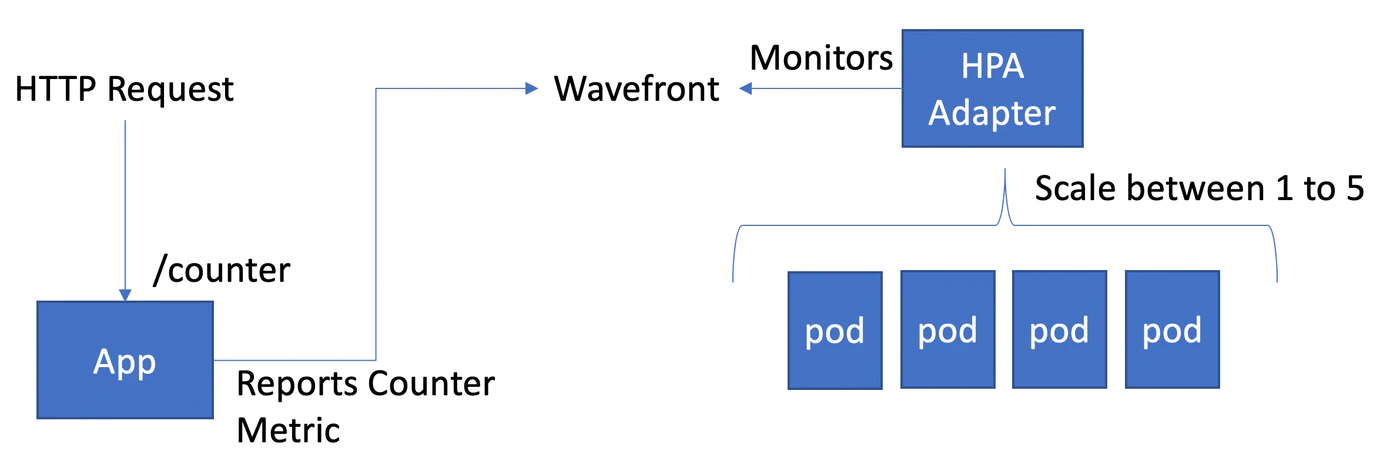
That is, a setup where requests sent to a web app (/counter) running separately from Kubernetes cause a scale-up. When no requests come, it gradually scales back down.
Despite calling this a "serverless look-alike", at least one Pod always keeps running.
That's because HPAScaleToZero — which allows an HPA min instance value of 0 — is still an Alpha implementation at the time of writing, not GA:
Once it goes GA, this gets closer to truly "serverless look-alike", but we give up on that for now.
Preparation
Refer to the previous preparation and installation.
Preparing the app
This time we write an application that sends Metrics to the Wavefront account we already have. There are many ways, but here we build the quickest kind: a Spring Boot app.
The app below can run anywhere that can reach Wavefront — your PC is fine. At minimum, OpenJDK must be installed.
https://github.com/mhoshi-vm/wf-demanabu-hpa
Clone this repository:
git clone https://github.com/mhoshi-vm/wf-demanabu-hpa
cd wf-demanabu-hpa
Then edit this file:
vi src/main/resources/application.properties
Register your Wavefront account and API key inside:
wavefront.freemium-account=false
management.metrics.export.wavefront.uri=https://<account>.wavefront.com
management.metrics.export.wavefront.api-token=<API key>
Once ready, start it:
./mvnw spring-boot:run
Once it's up, send requests to the URL for a while from another prompt:
curl localhost:8080/counter
If it prints Count Complete, all is well.
Now log into the Wavefront UI and run this Query:
mdiff(5m, ts(custom.metrics.counter))
If you see a graph like below — plateauing for 5 minutes at the number of curls executed — you're good:
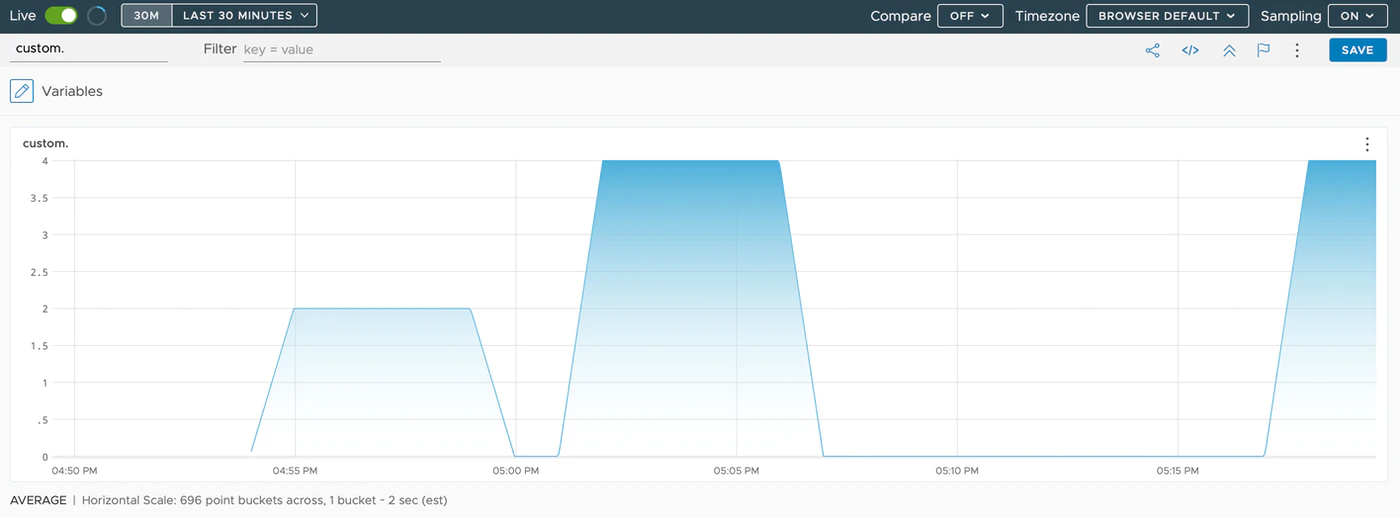
Leave the app running and move to the next step.
Preparing the HPA
Recreate the working namespace, which doubles as cleanup of last time's leftovers:
kubectl delete ns hpa
kubectl create ns hpa
Create the Kubernetes Deployment:
kubectl create deployment --image=nginx hpa-pods -n hpa
And this time create the following HPA:
cat <<EOF | kubectl apply -n hpa -f -
apiVersion: autoscaling/v2beta1
kind: HorizontalPodAutoscaler
metadata:
  name: example-hpa-external-metrics
  annotations:
    wavefront.com.external.metric/scale_counter: 'mdiff(5m, ts(custom.metrics.counter))'
spec:
  minReplicas: 1
  maxReplicas: 5
  metrics:
  - type: External
    external:
      metricName: scale_counter
      targetAverageValue: 1
  scaleTargetRef:
    apiVersion: apps/v1
    kind: Deployment
    name: hpa-pods
EOF
The crux:
- The metric to reference is expressed via an Annotation. In this case,
wavefront.com.external.metric/scale_counter: 'mdiff(5m, ts(custom.metrics.counter))' - spec.metrics defines the name specified in the Annotation. In this case,
scale_counter
That's the whole definition. Let's look at the created HPA:
kubectl get hpa -n hpa
NAME                           REFERENCE             TARGETS     MINPODS   MAXPODS   REPLICAS   AGE
example-hpa-external-metrics   Deployment/hpa-pods   0/1 (avg)   1         5         1          25m
In this state, run curl localhost:8080/counter three times.
After a while, the TARGETS value should settle near 1 — the curls executed. The Replica count also becomes 3:
kubectl get hpa -n hpa
NAME                           REFERENCE             TARGETS        MINPODS   MAXPODS   REPLICAS   AGE
example-hpa-external-metrics   Deployment/hpa-pods   967m/1 (avg)   1         5         3          26m
This is because the per-Pod average is computed: 3 (number of curls) / 3 (number of pods) = 1.
Then, five minutes later, it returns to 0, and the Replica count slowly approaches 1 again:
kubectl get hpa -n hpa
NAME                           REFERENCE             TARGETS     MINPODS   MAXPODS   REPLICAS   AGE
example-hpa-external-metrics   Deployment/hpa-pods   0/1 (avg)   1         5         1          35m
Summary
- With Wavefront's
external.metrics.k8s.io, HPA can work off any metric whatsoever.
Across this three-part series, we experienced how simply Wavefront + HPA can be implemented.