Learning Open Policy Agent with Tanzu Mission Control Part-4
· 9 min read
This article is part of the Learning Open Policy Agent with Tanzu Mission Control series.
Series
Part 1 : Overview
Part 2 : Playing with TMC's Open Policy Agent
Part 3 : Dissecting TMC's Open Policy Agent
Part 4 : Writing your own OPA policies from TMC < you are here
Introduction
Up to the previous part, we covered how OPA can be used in TMC.
On top of that, TMC offers what's called Custom Policies — a feature for writing your own OPA policies and managing them from the TMC UI.
To close out this series, let's introduce this feature.
Scenario — deny PV creation via StorageClass
We assume the following scenario.
In Kubernetes, creating a PersistentVolume normally flows like this: the developer defines a PersistentVolumeClaim, and the administrator defines the PersistentVolume.
That is Static volume assignment. The original intent was to prevent developers from creating storage on their own.
https://kubernetes.io/docs/concepts/storage/persistent-volumes/#static
However, there is a way to bypass this flow and create volumes dynamically at PersistentVolumeClaim time: StorageClasses.
That is Dynamic volume assignment. Convenient as it is, it has the problem that unlimited rogue storage requests become possible.
https://kubernetes.io/docs/concepts/storage/persistent-volumes/#dynamic https://kubernetes.io/docs/concepts/storage/storage-classes/
Quotas can restrict this, but they are per-Namespace settings, so there's a risk of gaps.
https://kubernetes.io/docs/tasks/administer-cluster/limit-storage-consumption/
So let's try protecting this with OPA.
Creating the OPA policy
First we need to create the OPA policy.
Referring to this post, extract the input information to feed OPA.
This time we define a rule at PVC creation: if storageClassName: default — as in the YAML below — is defined, creation is not allowed.
kind: PersistentVolumeClaim
apiVersion: v1
metadata:
  name: myclaim2
spec:
  accessModes:
  -  ReadWriteOnce
  resources:
    requests:
      storage: 1Gi
  storageClassName: default
With the input in hand, build the policy in the Playground. Here's the result:
https://play.openpolicyagent.org/p/4cKZIuijl2
It's very simple: if a StorageClassName is present in the Input, deny.
Registering the OPA rule in TMC as a Template
Now define this OPA rule in TMC. Select [Templates] in TMC's left pane, then [Create Templates]. [Provide Yaml] is where you define the ConstraintTemplates explained last time. For this scenario, enter the following:
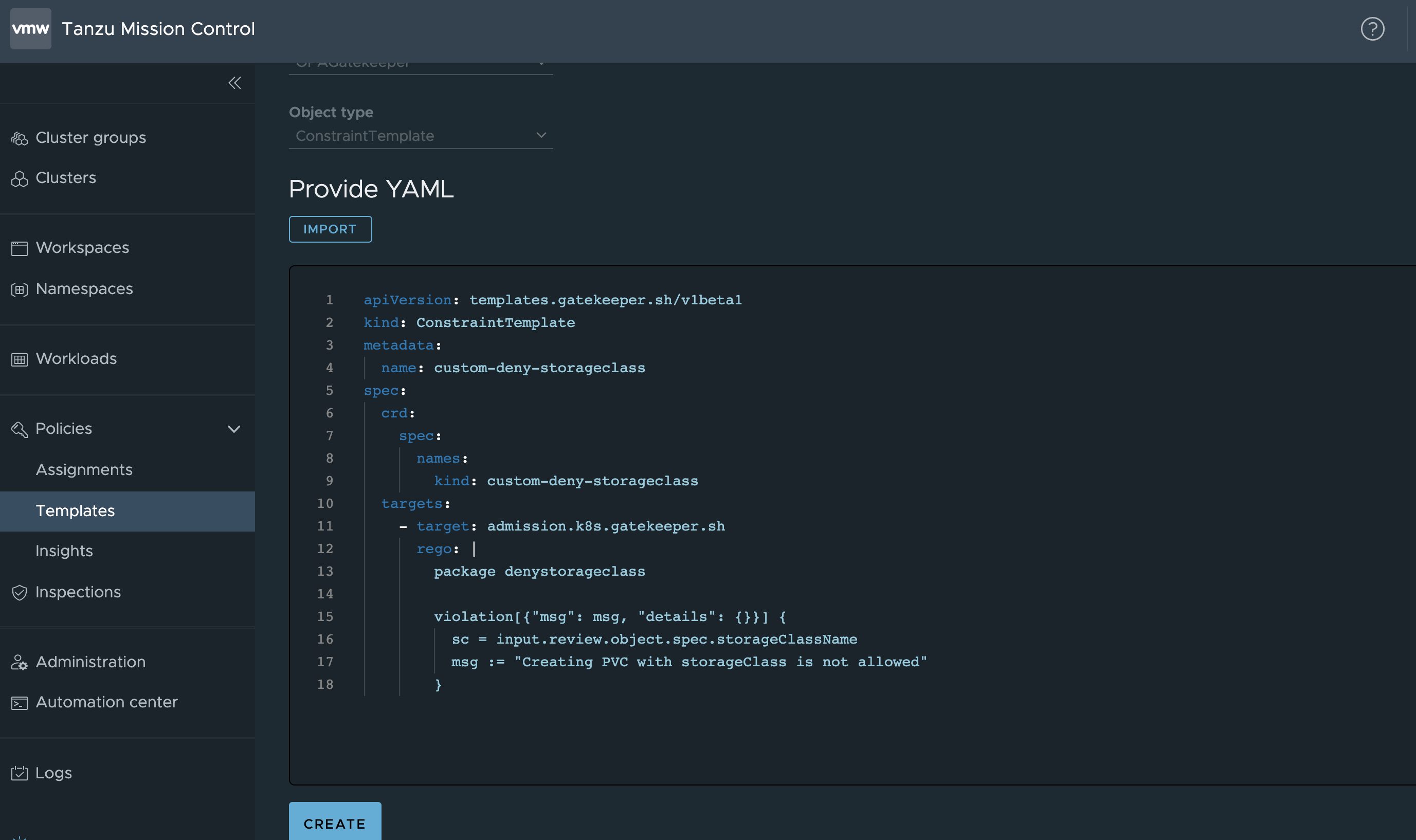
The YAML in the screenshot is:
apiVersion: templates.gatekeeper.sh/v1beta1
kind: ConstraintTemplate
metadata:
  name: custom-deny-storageclass
spec:
  crd:
    spec:
      names:
        kind: custom-deny-storageclass
  targets:
    - target: admission.k8s.gatekeeper.sh
      rego: |
        package denystorageclass

        violation[{"msg": msg, "details": {}}] {
          sc = input.review.object.spec.storageClassName
          msg := "Creating PVC with storageClass is not allowed"
        }
As shown, paste the OPA policy built in the previous step under rego.
The rest is mostly boilerplate; the key point is giving metadata.name and spec.crd.spec.names.kind values that don't collide with other rules.
Defining the Custom policy
After registering the Template, go to [Assignments] > [Custom] and select the cluster to apply the rule to.
Select the Template you just created and give it a name.
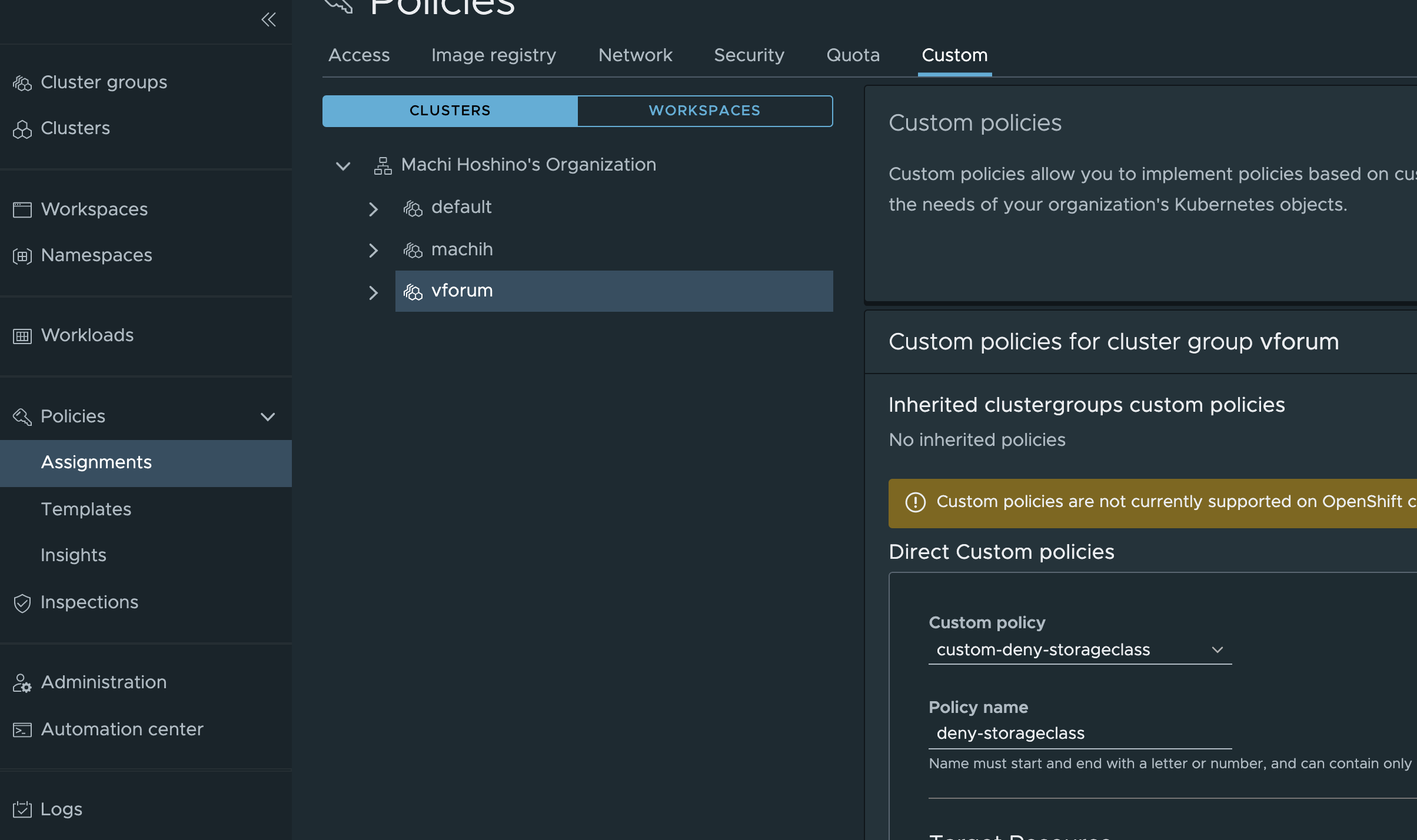
Next, TargetResource selects which resources the rule applies to.
This time select PersistentVolumeClaim. Additionally, "Exclude specific namespaces" lets you optionally set Namespaces exempted from this rule. This time we add allowstorageclass=true.
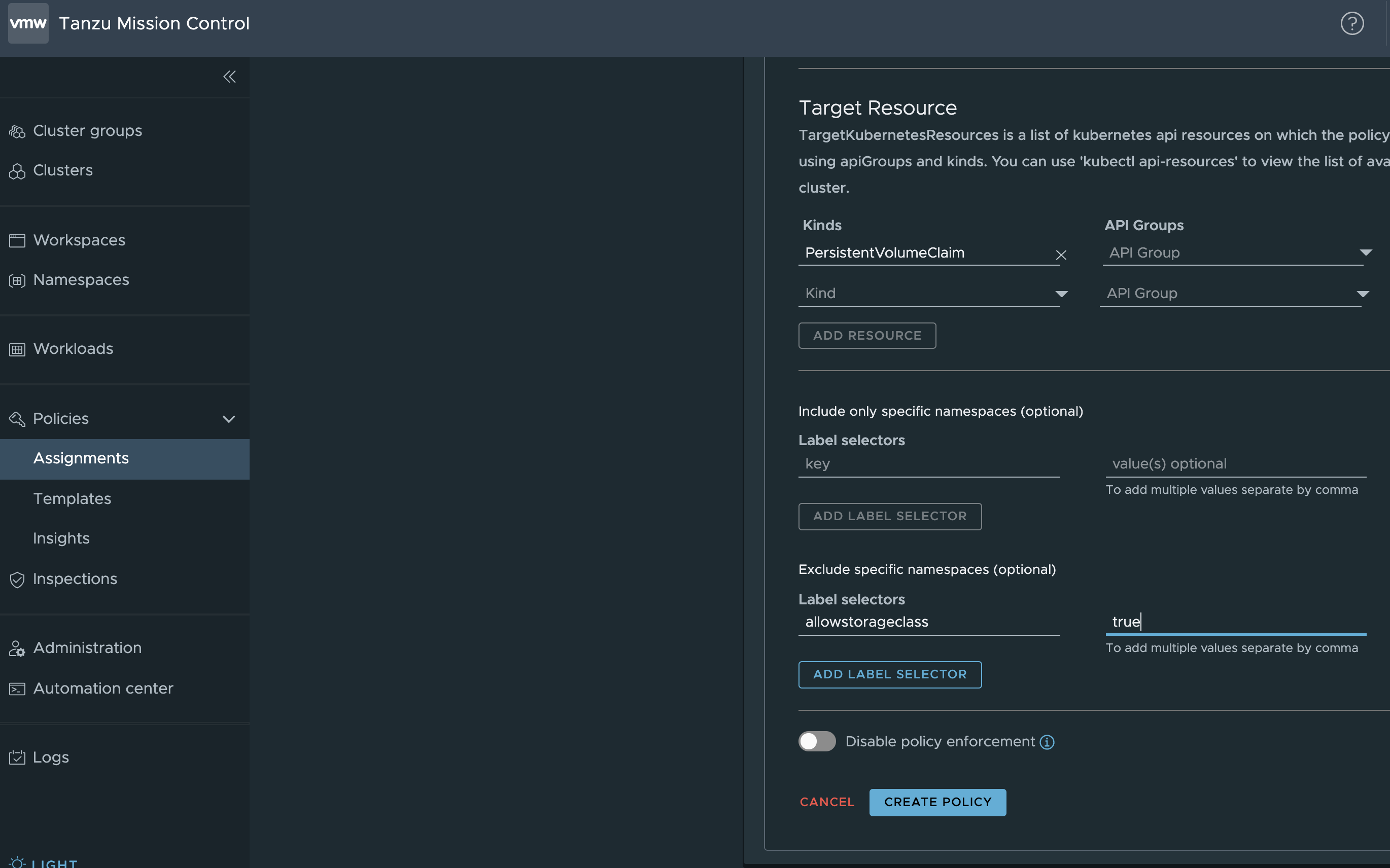
Run Create Policy in this state. Done.
Trying it out
On the target cluster, immediately try creating a PVC that violates the policy. The rule applies nicely and creation is denied:
% kubectl create -f pvc.yaml
Error from server ([denied by tmc.cgp.deny-storageclass] Creating PVC with storageClass is not allowed): error when creating "pvc.yaml": admission webhook "validation.gatekeeper.sh" denied the request: [denied by tmc.cgp.deny-storageclass] Creating PVC with storageClass is not allowed
Let's also try the Namespace exception rule.
First create a Namespace and add the allowstorageclass=true label:
% kubectl create ns test
namespace/test created
% kubectl label namespace test allowstorageclass=true
namespace/test labeled
In this Namespace, the PVC creates without issue:
% kubectl create -f pvc.yaml -n test
persistentvolumeclaim/myclaim2 created
% kubectl get pvc -n test
NAME       STATUS   VOLUME                                     CAPACITY   ACCESS MODES   STORAGECLASS   AGE
myclaim2   Bound    pvc-2116cbbd-7fb8-45b7-92cc-cfe43bbc899c   1Gi        RWO            default        6s
Just as expected.
Summary
Part 4 introduced how to write your own OPA policies using TMC. It turned out to be remarkably simple. And through this series, TMC helped us understand OPA much more deeply.