Spring Enterprise: A Guide to Application Advisor (Patch Apply)
· 17 min read
This post introduces Application Advisor, which comes with Spring Enterprise, as a supplement to the official manual.
In this entry I'll focus on the patch apply feature.
Introduction
Customers who purchase Spring Enterprise (the commercial edition) also get a product called Application Advisor. The Application Advisor manual is here (v1.6).
Application Advisor provides two major patching features.
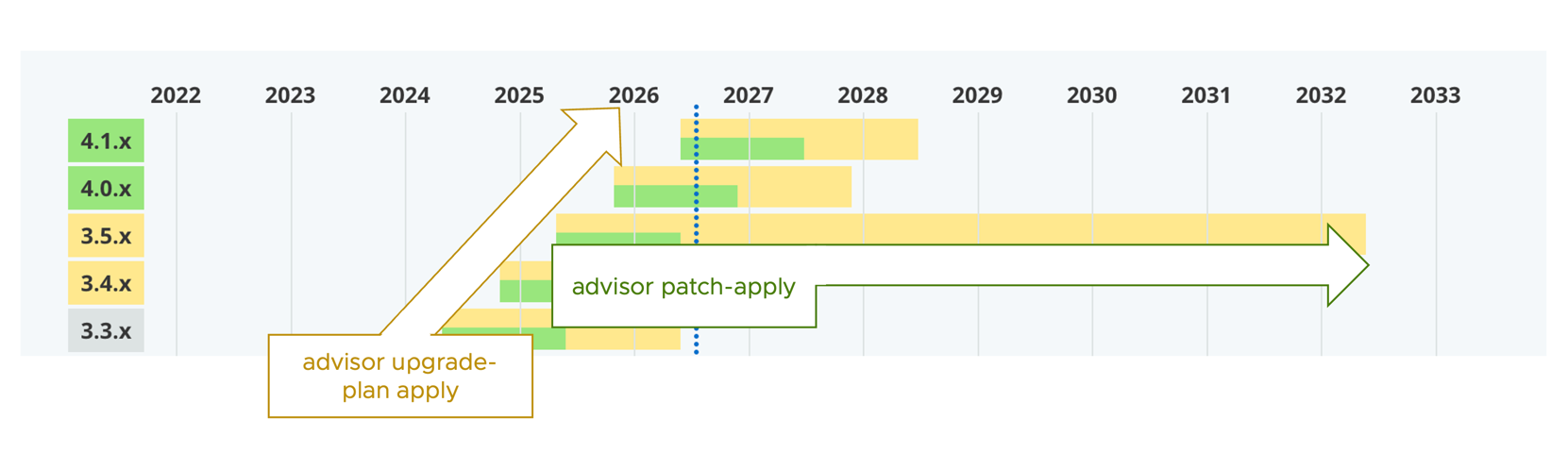
advisor patch apply: used for hotfixes and patch versions onlyadvisor upgrade-plan apply: used for minor and major version upgrades
patch apply is aimed at customers who want to respond to security vulnerabilities quickly.
It mainly offers the following:
- Coverage across Spring's long-term support window
- Automatic pull request creation on GitHub
- Patch management for Spring's transitive dependencies
What are "transitive dependencies"?
The term "transitive dependencies" comes up a lot in explanations of patch apply.
Spring Framework and Spring Boot themselves depend on many Java libraries that they don't own. Spring Boot's external dependencies are listed below. For example, Jackson / tools.jackson.core is used for JSON serialization and deserialization.
https://docs.spring.io/spring-boot/appendix/dependency-versions/coordinates.html
You can use these libraries without declaring them explicitly in your pom.xml or build.gradle.
Those are what "transitive dependencies" refers to.
Now, Spring Framework and Spring Boot currently ship patches roughly every 1.5 to 2 months. However, these dependencies outside of Spring's control may be released on a completely different schedule. If such an external release contains a vulnerability fix, you are unintentionally exposed to that vulnerability until Spring picks it up.
Here's a diagram of what that looks like. It's just one example, but tools.jackson.core 3.1.5 was released in July 2026, while Spring Boot 4.1.1, which picked it up, was released in August 2026.
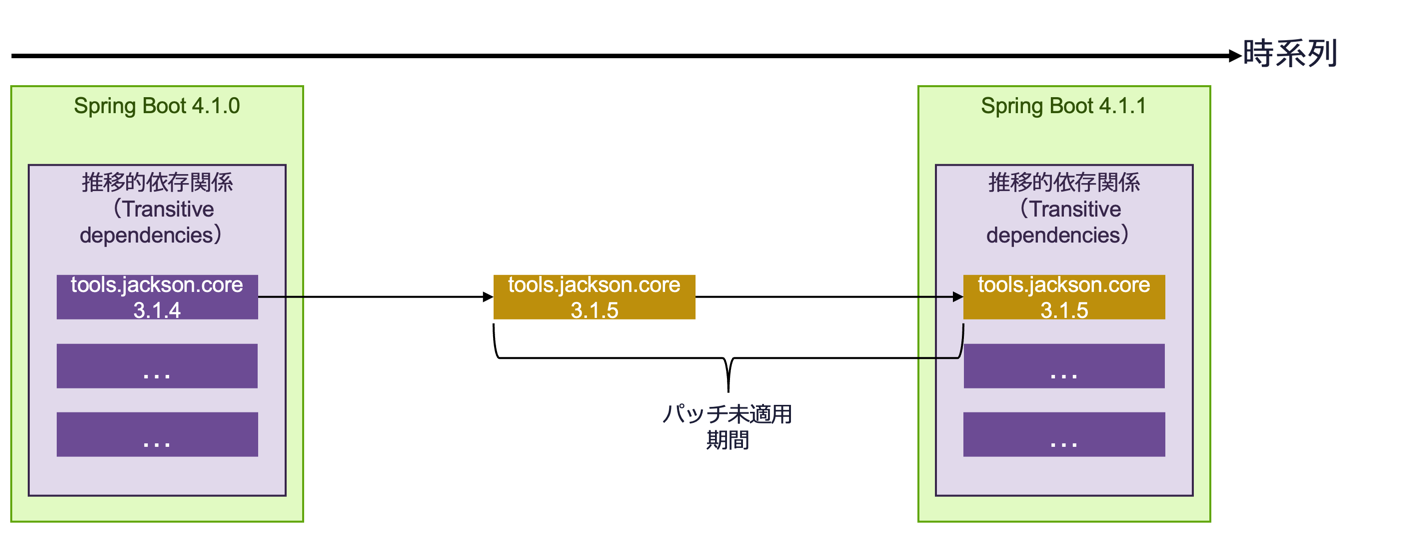
Given the kind of LLM-driven vulnerability attacks we see these days, that one-month gap is becoming hard to ignore.
To address this, every time it runs, patch apply finds patches for transitive dependencies as well and adds the dependencies where necessary. It also removes them once a later release picks them up and they are no longer needed.
The diagram below illustrates this.
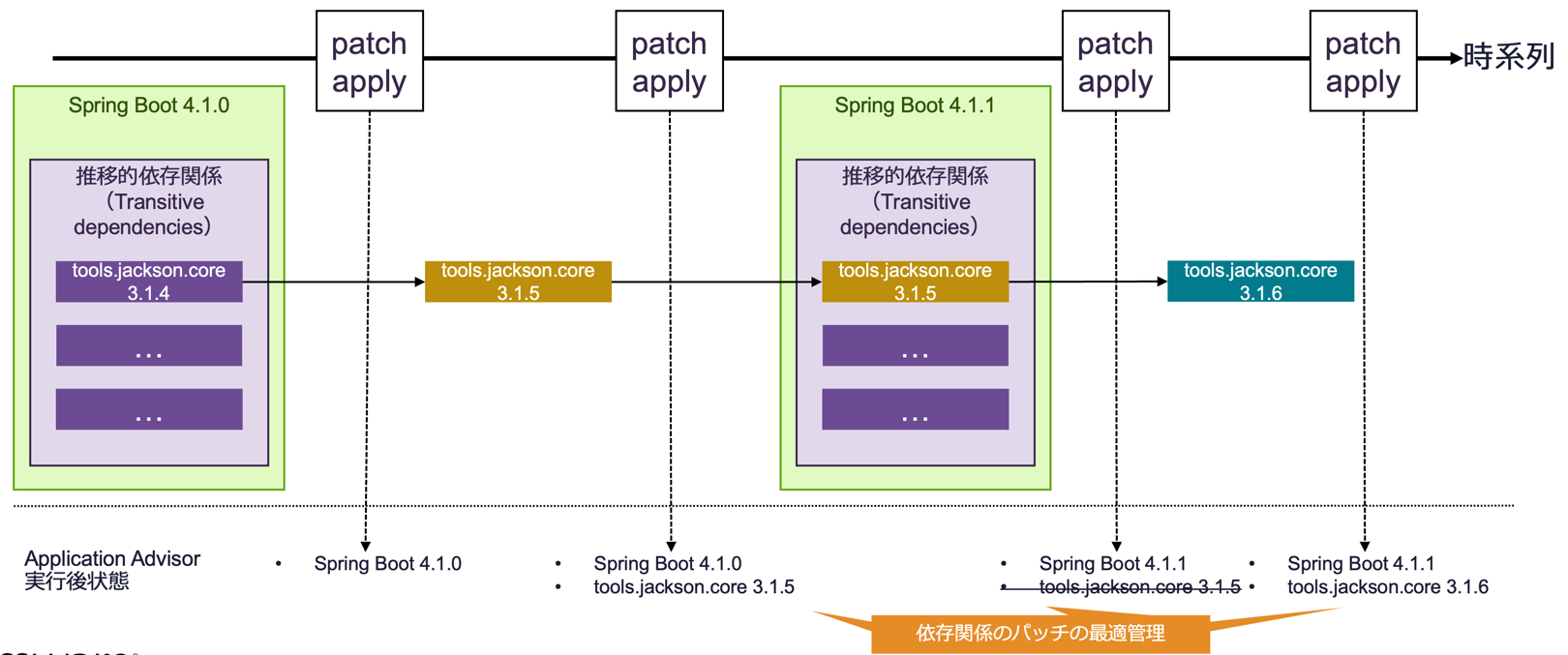
Application Advisor works out your code's dependencies, queries the Maven repositories, and sets up the state above automatically. Note that although this post focuses on Spring, Application Advisor basically walks through all of your application's dependencies, so it works for non-Spring libraries too.
As of writing, patch apply decides which patch version to apply from each Java dependency's Semantic Versioning.
Take tools.jackson.core: 3.2.x has been released as of 2026, but from the 3.1.x that Spring Boot 4.1 bundles that is a minor version bump, so it isn't applied.
In other words it will do 3.1.4 → 3.1.5, but not 3.1.4 → 3.2.2.
For major and minor version upgrades of a Java dependency you use upgrade-plan apply rather than patch apply.
Getting Application Advisor running
Running Application Advisor's patch apply takes two steps.
1. Download the CLI
Follow the steps in the manual (the link below is for 1.6).
The manual shows how to do this with curl, but if you have the Spring Enterprise Repository configured, you can also download it with a command like the following.
(This example downloads 1.6.7 for Mac ARM64.)
Running it puts the tar under ~/.m2/repository/com/vmware/tanzu/spring/application-advisor-cli-macos-arm64/.
mvn -U dependency:get -Dartifact=com.vmware.tanzu.spring:application-advisor-cli-macos-arm64:1.6.7:tar -Dtransitive=false
2. Run it
Run the following in the directory of the target source code — somewhere you can build with Maven or a similar tool.
advisor patch apply
That's basically all there is to it. Dependency resolution runs afterwards in detail, so be prepared for it to take five minutes or more. (Running it from CI or Cron is recommended over running it by hand.)
The output looks like this.
   /path/to/your-app/pom.xml
      scope: compile
         tools.jackson.core:jackson-databind:3.1.4 → 3.1.5
         org.apache.commons:commons-lang3:3.17.0 → 3.17.1

🚀 Patch apply complete: 2 dependency(-ies) upgraded in 1 file(s).
If there are no patches at all, you only get this.
✅ All dependencies are up to date. No new patches available.
Add --push and it will detect the Git directory and create a PR for you as well.
The options around PR creation are as follows.
GIT_TOKEN_FOR_PRSenvironment variable: a token with permission to create PRs. Required if you use--push.--token: pass the token directly instead of using the environment variable above (defaults to$GIT_TOKEN_FOR_PRS)--scm-host: required if you use a self-hosted GitHub Enterprise or GitLab. Anything other thangithub.comandgitlab.comwill fail unless you specify this (e.g.gitlab.mycompany.com, defaults to$ADVISOR_SCM_HOST)--branch-prefix: prefix for the branch it creates (e.g.advisor/)--current-branch: explicitly specify the branch the PR is created from
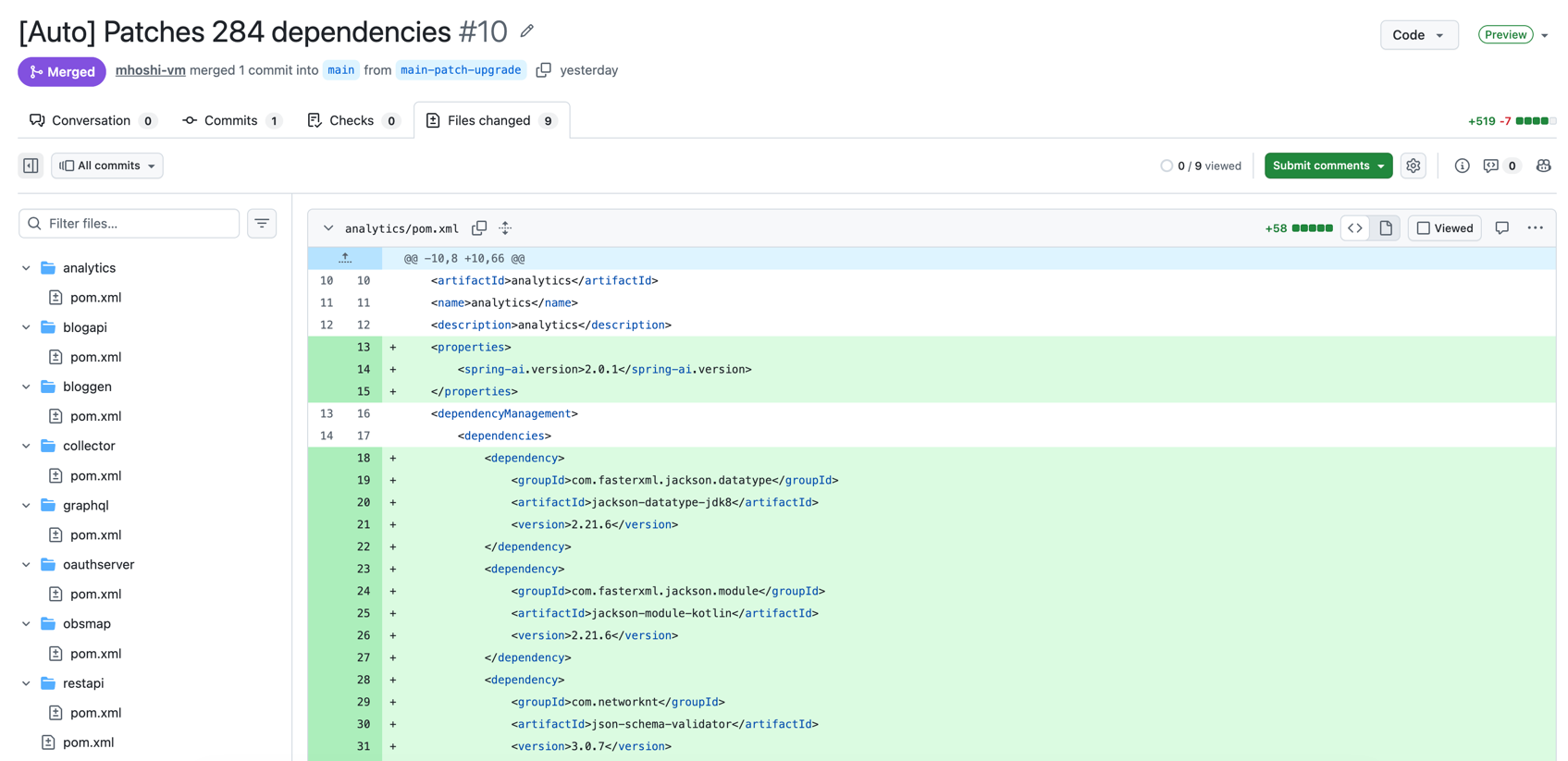
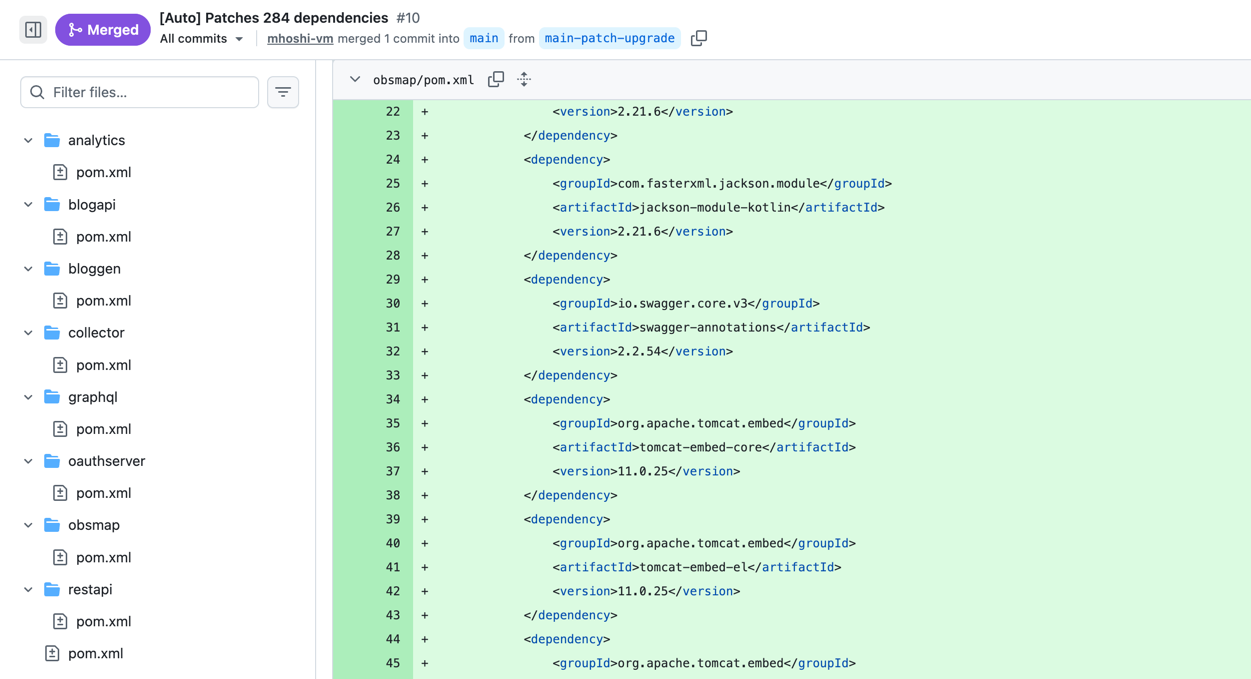
Here's the result of running it against a real codebase.
What it takes to use Patch Apply in production
Here are some other tips for taking this to production.
How and where should you run it?
As mentioned above, advisor resolves your Java dependencies when it runs. So wherever you run advisor needs to meet the following conditions.
- It can reach the Maven repositories needed to build the source code
- The token for the Spring Enterprise Repository is set up
The following isn't strictly required, but it is needed for --push to succeed.
- The Git repository for the source code
Given those, here's what I'd recommend.
- Recommended: a daily Cron job on some server
If your goal is to track Spring and other dependencies, running it daily should be enough.
Realistically, run it with --push so the changes come out as a Pull Request and let developers decide whether to apply them.
- Not so recommended: on every commit in CI
The manual reads as if it recommends this, but personally I'm skeptical. Of course, if your developers can keep up with that on every commit, it's the ideal setup — but I suspect it would end up being ignored as noisy notifications. Also, this only pays off once a dependency patch actually ships, so rather than the irregular cadence of CI, Cron should be fine.
Do you need Java installed where it runs?
Yes.
The advisor CLI itself is a GraalVM native binary, so it doesn't need Java — but it invokes your build tool (mvnw / mvn / gradlew / gradle) internally to get the dependency list, and that needs a JDK.
There are some related options.
--build-tool: which build tool to use (defaults tomvnwif a wrapper exists, otherwisemvn)--build-tool-options: arguments to pass to the build tool--build-tool-jvm-args: JVM arguments to pass to the build tool (defaults to$BUILD_TOOL_JVM_ARGS). Handy when you want to keep memory usage down on a Cron server.
Does it work in an air-gapped environment?
The advisor CLI does support air-gapped environments. That said, as noted above, access to Maven repositories is mandatory so that dependencies can be resolved. An internal mirror (Artifactory, Nexus, and so on) is fine, though — this doesn't mean you need direct internet connectivity.
How often should you update the Advisor CLI?
If your goal is just to keep running patch apply, you don't need to update the advisor CLI.
Still, bugs in the advisor CLI may have been fixed, so trying the latest version whenever you can is a good idea.
How complex can the codebase be?
At the very least, it worked on a multi-module project.
Below is an example where each module references the root pom.xml.
In that case, run the advisor cli from the root directory.
Here's the project I actually tried it on.
Does it work with Spring Framework?
By design it works with Spring Framework as well, not just Spring Boot.
Can applying patches break your code?
By design, patch apply does mean you're applying dependency versions ahead of Spring Boot releasing and testing them.
On that point, it appears to be built on the assumption that "we trust each library to follow Semantic Versioning."
advisor only applies patch versions of a given dependency (e.g. it will apply tools.jackson.core 3.1.4 → 3.1.5, but not 3.1.4 → 3.2.2).
In other words, it applies them assuming library authors preserve compatibility across patch versions.
That said, some dependencies may well not follow that, in which case you exclude them as shown below.
Can you ignore specific dependencies?
You can write settings in an .advisor.yml file to ignore specific dependencies.
The format is similar to Dependabot's.
version: 1
updates:
  - package-ecosystem: "maven"
    directory: "/"
    ignore:
      # Never patch this library
      - dependency-name: "com.example:lib-a"
      # Exclude only the 6.x line
      - dependency-name: "org.springframework:spring-web"
        versions: ["6.x"]
A few things to watch out for.
- Writing
enabled: falseskipspatch applyentirely for that project. Useful when you invoke it uniformly from CI or Cron and want to stop just one repository. - An empty
.advisor.ymlis a parse error. Don't just drop in an empty file.
Wrap-up
I wrote about Application Advisor's patch apply.
Next time I plan to cover the other side, advisor upgrade-plan apply (minor and major version upgrades).