Things You Don't Need to Know about Tanzu Platform — Kine/KCP
· 17 min read
I'll be writing up the content about the latest product, Tanzu Platform, that felt too maniacal to blog about. As a caveat: everything from here on is stuff you "don't need to know".
This time, I explain Kine / KCP.
Kine ? KCP ?
An important component of TP's Kubernetes management is the Unified Control Plane (UCP). This is the component managing Spaces and Capabilities.
When you first touch UCP, even Kubernetes veterans encounter many unfamiliar terms, and you might mistakenly assume it's a proprietary implementation — but it actually builds on existing OSS projects.
The key components within UCP are Kine / KCP.
- Kine: a Kubernetes project — a lightweight Kubernetes API server that runs standalone and on databases other than etcd.
- KCP: a way to partition and serve the Kubernetes API in units called Workspaces.
Architecture
At the time of writing, TP's use of Kine / KCP looks like this:
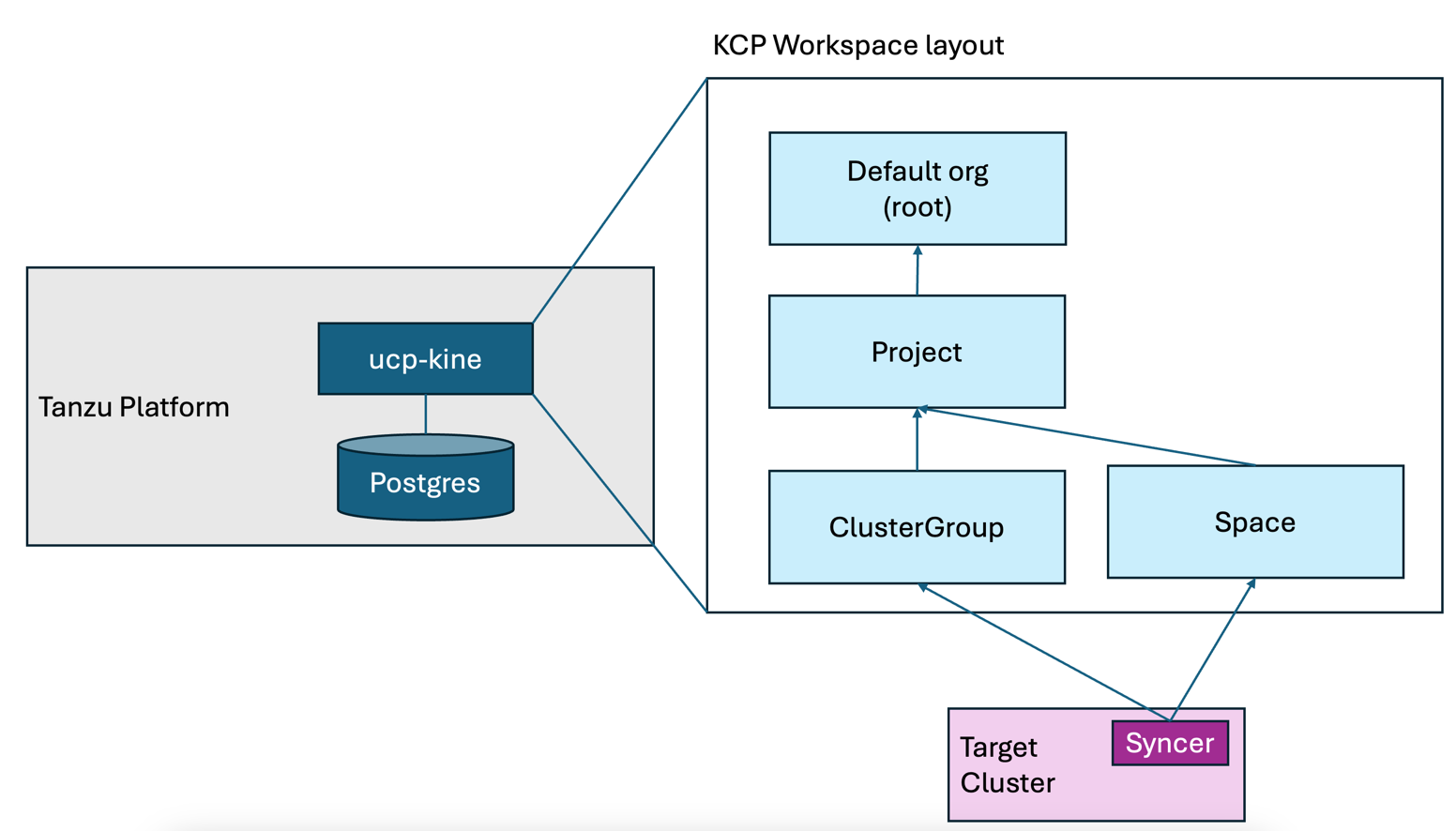
Inside Tanzu Platform lives a Kine. This Kine uses Postgres as its database. You can actually find it with:
% kubectl get po -n tanzusm | egrep "ucp-kine|postgres"
postgres-endpoint-controller-6b75bf6bdd-qccss           1/1     Running     0               13d
postgresql-0                                            2/2     Running     0               13d
ucp-kine-85d49b4bbd-f4p6d                               1/1     Running     0               13d
ucp-kine-85d49b4bbd-zjkbh                               1/1     Running     0               13d
Operating Tanzu Platform you'll likely never think about Kine.
If anything, even looking at the API objects inside TP's own K8s cluster is almost useless for diagnosing application problems.
For example, running kubectl api-resources on the cluster running TP shows almost nothing representing the state of deployed applications.
(Incidentally, to learn the state of applications deployed from Tanzu Platform you can use graphql — but that's also too maniacal, so it'll be a separate article.)
This Kine exists not as a plain Kubernetes but to form the KCP cluster. Which brings us to digging a little deeper into KCP.
The relationship between tanzu xxx use and KCP
TP articles so far featured commands like:
tanzu project usetanzu space usetanzu operations clustergroup use
All of these tanzu xxx use commands perform switching between what KCP calls workspaces.
When you tanzu login, a kubeconfig file is stored on your machine at ~/.config/tanzu/kube/config.
The contents of this kubeconfig change every time you tanzu xxx use.
For example, running tanzu project use...
% tanzu project use tpadmin
✓ Successfully set project to tpadmin
Comparing with the original file shows the difference:
% diff ~/.config/tanzu/kube/config /tmp/tp-config
5,6c5,6
<     server: https://tp.aws.lespaulstudioplus.info/org/c957a32b-b30c-21f7-95e1-f22cffe0eecf/project/dc7d70e1-d928-4bb2-88f5-ac0fc25c8524
<   name: tanzu-cli-tpsm-885188f8:tpadmin
---
>     server: https://tp.aws.lespaulstudioplus.info/org/c957a32b-b30c-21f7-95e1-f22cffe0eecf/project/dc7d70e1-d928-4bb2-88f5-ac0fc25c8524/clustergroup/run-lite
>   name: tanzu-cli-tpsm-885188f8:tpadmin:run-lite
9c9
<     cluster: tanzu-cli-tpsm-885188f8:tpadmin
---
>     cluster: tanzu-cli-tpsm-885188f8:tpadmin:run-lite
11,12c11,12
<   name: tanzu-cli-tpsm-885188f8:tpadmin
< current-context: tanzu-cli-tpsm-885188f8:tpadmin
---
>   name: tanzu-cli-tpsm-885188f8:tpadmin:run-lite
> current-context: tanzu-cli-tpsm-885188f8:tpadmin:run-lite
From this state, running tanzu space use...
% tanzu space use app1
✓ Successfully set space to app1
Again a difference appears:
mh013301@PJQ72XCV5C manifests % diff ~/.config/tanzu/kube/config /tmp/tp-config
5,6c5,6
<     server: https://tp.aws.lespaulstudioplus.info/org/c957a32b-b30c-21f7-95e1-f22cffe0eecf/project/dc7d70e1-d928-4bb2-88f5-ac0fc25c8524/space/app1
<   name: tanzu-cli-tpsm-885188f8:tpadmin:app1
---
>     server: https://tp.aws.lespaulstudioplus.info/org/c957a32b-b30c-21f7-95e1-f22cffe0eecf/project/dc7d70e1-d928-4bb2-88f5-ac0fc25c8524
>   name: tanzu-cli-tpsm-885188f8:tpadmin
9c9
<     cluster: tanzu-cli-tpsm-885188f8:tpadmin:app1
---
>     cluster: tanzu-cli-tpsm-885188f8:tpadmin
11,12c11,12
<   name: tanzu-cli-tpsm-885188f8:tpadmin:app1
< current-context: tanzu-cli-tpsm-885188f8:tpadmin:app1
---
>   name: tanzu-cli-tpsm-885188f8:tpadmin
> current-context: tanzu-cli-tpsm-885188f8:tpadmin
Furthermore, running tanzu operations clustergroup use...
% tanzu operations clustergroup use run
ℹ  project has been set to tpadmin
ℹ  successfully set clustergroup to run
Yet another difference:
mh013301@PJQ72XCV5C manifests % diff ~/.config/tanzu/kube/config /tmp/tp-config
5,6c5,6
<     server: https://tp.aws.lespaulstudioplus.info/org/c957a32b-b30c-21f7-95e1-f22cffe0eecf/project/dc7d70e1-d928-4bb2-88f5-ac0fc25c8524/clustergroup/run
<   name: tanzu-cli-tpsm-885188f8:tpadmin:run
---
>     server: https://tp.aws.lespaulstudioplus.info/org/c957a32b-b30c-21f7-95e1-f22cffe0eecf/project/dc7d70e1-d928-4bb2-88f5-ac0fc25c8524
>   name: tanzu-cli-tpsm-885188f8:tpadmin
9c9
<     cluster: tanzu-cli-tpsm-885188f8:tpadmin:run
---
>     cluster: tanzu-cli-tpsm-885188f8:tpadmin
11,12c11,12
<   name: tanzu-cli-tpsm-885188f8:tpadmin:run
< current-context: tanzu-cli-tpsm-885188f8:tpadmin:run
---
>   name: tanzu-cli-tpsm-885188f8:tpadmin
> current-context: tanzu-cli-tpsm-885188f8:tpadmin
Each returns a different response like this.
There are two points. First, the server: value: the URL path changes, but everything fundamentally connects to tp.aws.lespaulstudioplus.info, my environment's TP.
The second point is the cluster: value, which takes the form tanzu-cli-tpsm-885188f8:<project>:<space or clustergroup>.
This corresponds to a KCP workspace. Each KCP workspace is assigned what's called a Virtual Cluster — a virtual k8s cluster.
These virtual k8s clusters are Kubernetes instances that can be created instantly without needing etcd and the like.
TP uses an extended version of KCP. One reason is that each workspace becomes a fully isolated space, making RBAC configurations easier to build. Indeed, TP's RBAC documentation shows a picture resembling the KCP structure, with RBAC configurable for each:
Looking at tanzu deploy again
With this knowledge, let's revisit the post-deploy state from this article.
First, point the kubeconfig at ~/.config/tanzu/kube/config:
export KUBECONFIG=~/.config/tanzu/kube/config
Switch to the Project:
tanzu project use tpadmin
Doing this puts us, in KCP terms, at the top of this picture:
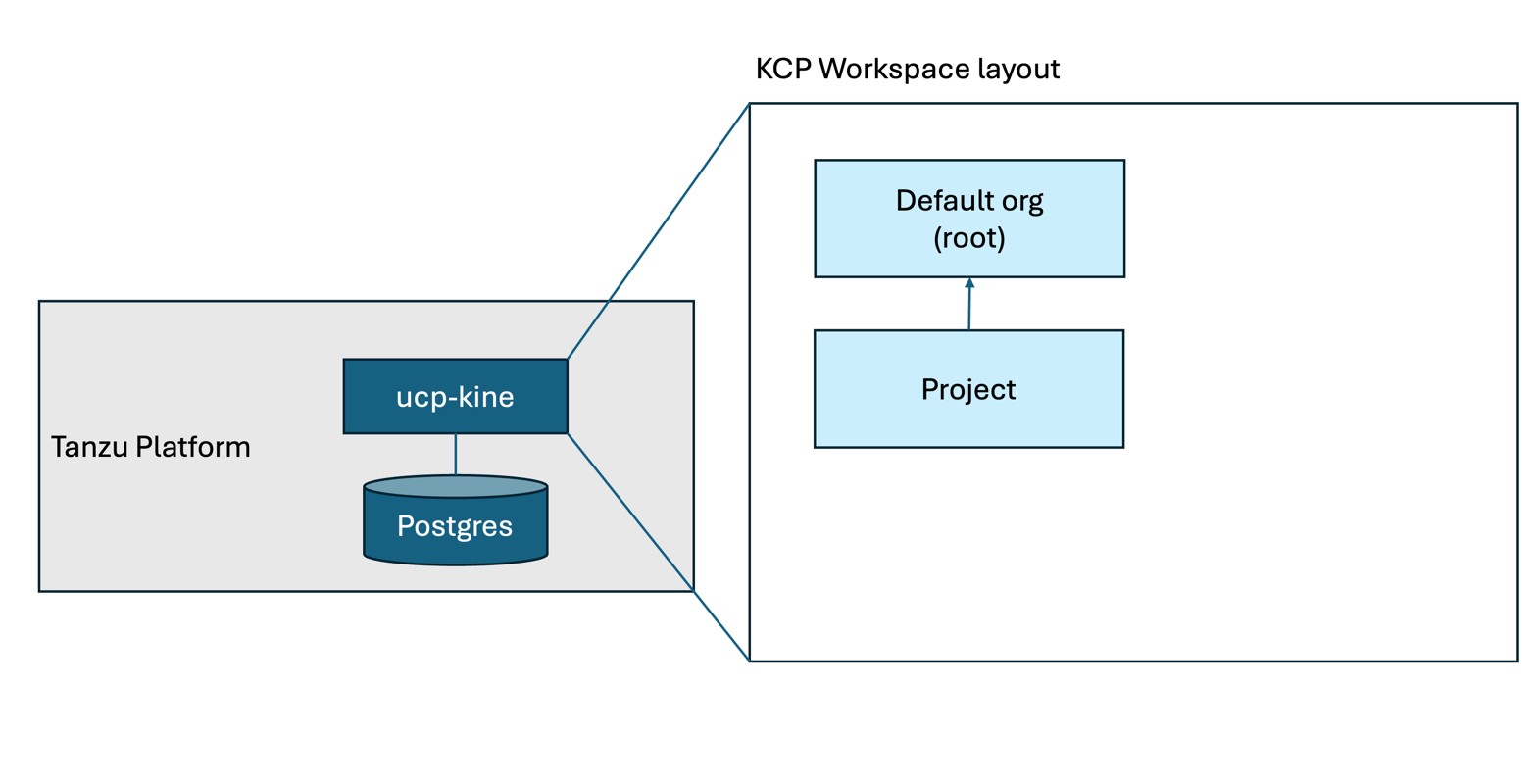
Let's look inside with kubectl rather than the tanzu cli.
Running kubectl api-resources lists the APIs executable in this workspace.
The platform build configuration from this article is also visible.
This is what gets shared with each space:
% kubectl get buildconfigurations
NAME
dev-project-bld-cfg
You can also list the ClusterGroups and Spaces tied to this project:
% kubectl get clustergroups
NAME
run
run-lite
% kubectl get spaces
NAME   AGE
app1   3d16h
Now switch to the space:
tanzu space use app1
Pictured, we're now in this state:
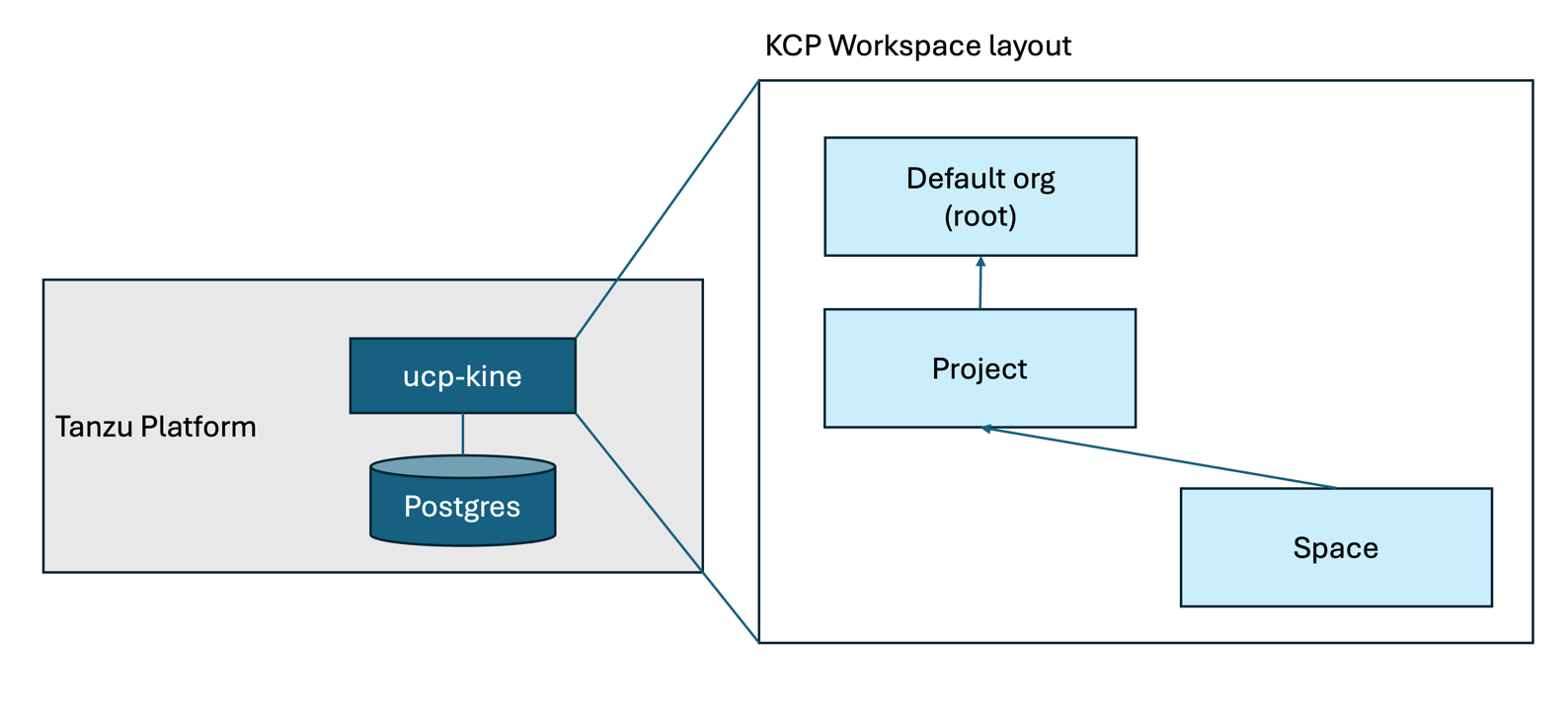
Running kubectl api-resources here gives a very different result from the Project selection earlier.
For example, listing ClusterGroups or Spaces here gets you told no such API exists.
This is the expected result: the workspace changed, so the executable API set changed too.
% kubectl get clustergroups
error: the server doesn't have a resource type "clustergroups"
% kubectl get spaces
error: the server doesn't have a resource type "spaces"
This workspace holds the app information; ContainerApps is the deployment info:
% kubectl get containerapps
NAME   DESCRIPTION   AGE     STATUS
app                  3d16h   DeploySucceeded
The domain binding info that has appeared several times also lives in this workspace:
% kubectl get domainbindings
NAME   DOMAIN                                           PORT   HTTP
bar    busy-penguin.app.tp.aws.lespaulstudioplus.info   443    {}
Resources defined in a Space are synchronized to the opposite Kubernetes by a process called the Syncer. Pictured, that's this state:
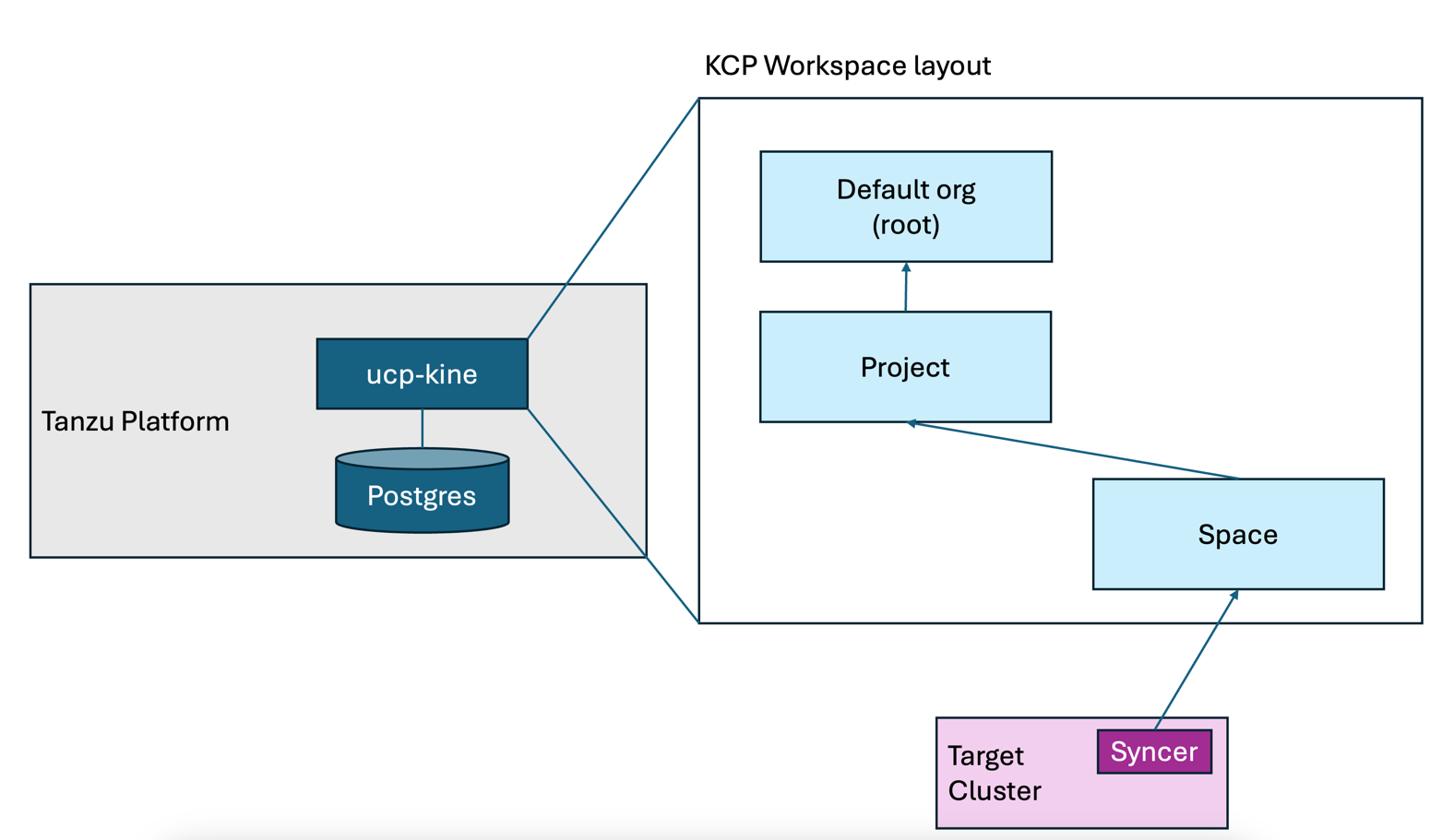
This Syncer is bidirectional: it doesn't just execute resources written into KCP, it also reports execution results back to KCP, so statuses can be seen from the KCP side.
For example, looking at the domain binding status with the command below, the endpoint IP address — which normally only the execution target knows — is visible on the KCP side.
The tanzu domain-bindings get introduced in this article uses this output.
% kubectl get domainbindings bar -o jsonpath='{.status.addresses[].value}'
192.168.251.40%
Properly, Space objects should only be manipulated via the tanzu cli, but technically you can create them with kubectl. For example, let's create a Secret in this Space:
kubectl create secret generic sync-test --from-literal=sync=test
The Secret was created on the Space:
% kubectl get secret
NAME
sync-test
If you have access to the deploy-target k8s cluster, you can see the Secret created here has been synchronized:
% export KUBECONFIG=<deploy target kubeconfig>
% kubectl get secret -n app1-674bb96796-cfj79
NAME                       TYPE                             DATA   AGE
app-fetch-0                kubernetes.io/dockerconfigjson   1      3d17h
app-registry               kubernetes.io/dockerconfigjson   1      3d17h
app-values                 Opaque                           1      3d17h
app2-fetch-0               kubernetes.io/dockerconfigjson   1      23h
app2-registry              kubernetes.io/dockerconfigjson   1      23h
app2-values                Opaque                           1      23h
sync-test                  Opaque                           1      3m46s  <<<<<<<<<<<<<<
tanzu-sidecar-fetch-cred   kubernetes.io/dockerconfigjson   1      3d17h
So purely by operating on KCP, you can create and reflect objects on the deploy target.
By leveraging this, TP enables developers to deploy to k8s just by authenticating to TP — RBAC included. Many customers give feedback that creating and managing kubeconfigs is a painful operation; this might solve it.
Now, I wrote that the api-resources inside a Space is the list of APIs that can be synchronized to the opposite cluster.
Looking at it, though, it feels like a very limited set of APIs, and you'll want to customize it... right?
The keys to that customization are Capabilities and Profiles — also too maniacal a topic, so they get their own article.
That was the introduction to Kine/KCP.