How to Contribute to Crossplane / Upbound
· 7 min read
Crossplane is a component that lets you control IaaS from Kubernetes, Terraform-style. A particularly common use case is managing AWS resources from Crossplane.
It's still a young project, so it often doesn't behave the way you expect. In that case, I recommend either building your own patch or contributing to the community yourself.
Here are my notes on what was needed to customize Crossplane's Upbound/Provider AWS and raise a pull request.
Incidentally, I don't think the procedure was documented very well, but the contents of this pull request were helpful:
https://github.com/upbound/provider-aws/pull/814
Customization steps
1. Clone the repository locally
https://github.com/upbound/provider-aws
2. Open the code in an IDE
The code is in Go, so I recommend opening it with some IDE. I used IntelliJ.
3. Understand which parts you may touch
I haven't investigated in detail, but because a code-generation framework is used, most places must not be edited. (Even if you edit them, the build reverts your changes.)
Basically, the code you may modify by hand seems to be under the config directory.
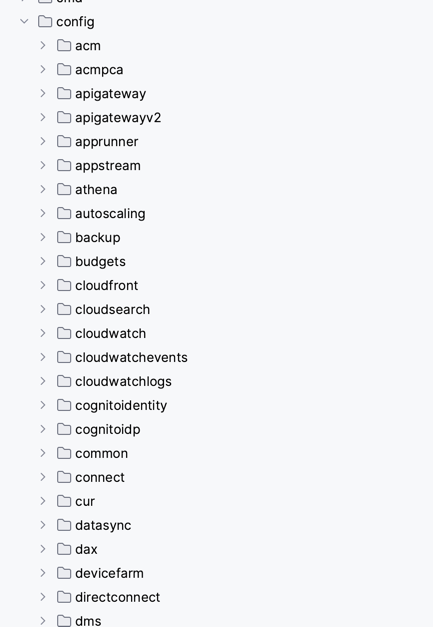
I won't go into how the code works in detail; refer to the pull request I made:
https://github.com/upbound/provider-aws/pull/826/files
This PR as well only touches code under config — the remaining diff is auto-generated at build time:
https://github.com/upbound/provider-aws/pull/831/files
4. Test your changes locally
With a slight hack, you can test on your machine with the commands below. (Prerequisite: the terraform CLI is installed locally.)
First install goimports:
go install golang.org/x/tools/cmd/goimports@latest
Doing this in the same prompt can leave goimports missing, so start a separate prompt.
Then generate the code:
make generate
When managing AWS resources, obtaining permissions via IRSA is preferable; exporting environment variables like these enables IRSA:
export AWS_STS_REGIONAL_ENDPOINTS=regional
export AWS_DEFAULT_REGION=us-west-1
export AWS_REGION=us-west-1
export AWS_ROLE_ARN=<role>
export AWS_WEB_IDENTITY_TOKEN_FILE=./token
Then start it:
export KUBECONFIG=<kubeconfig>
make run
When managing AWS, by default the monolith object starts up, launching more objects than necessary.
Tweaking the following part of the Makefile before make run keeps what starts up under control.
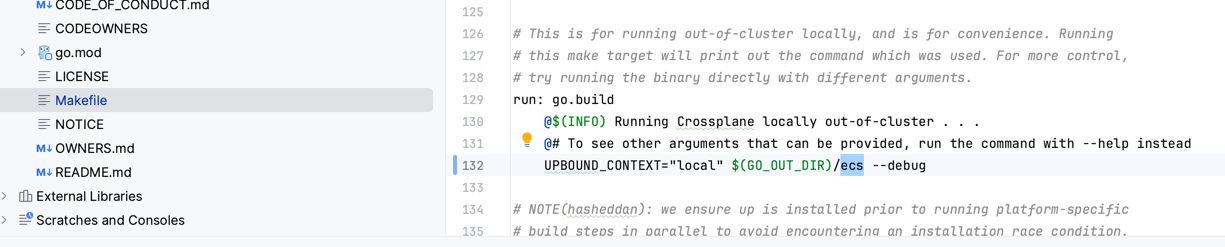
5. Build a container image with your edits
Building fundamentally requires go, so install it and set GO_ROOT.
(With IntelliJ, use what's installed under $HOME/sdk.)
We build only the edited parts. Prepare a registry reachable from the Kubernetes cluster used for testing, and run:
make submodules
export DOCKER_REGISTRY=ghcr.io/mhoshi-vm/custom-upbound
export BUILD_REGISTRY=ghcr.io/mhoshi-vm/custom-upbound
export XPKG_REG_ORGS=ghcr.io/mhoshi-vm/custom-upbound
export REGISTRY_ORGS=ghcr.io/mhoshi-vm/custom-upbound
Then build with the command below. The point is limiting the build targets with SUBPACKAGES. Provider AWS in particular has a huge number of modules, so restricting to what you need is recommended.
That said, having just one plugin at a different version doesn't seem to be allowed,
so alongside what you edited, also specify the plugins actually used in your environment.
This example builds ecs, ec2 and elbv2:
make build.all publish BRANCH_NAME=main SUBPACKAGES="ecs ec2 elbv2 config"
6. Then try it out with Crossplane
Then just install as usual:
https://marketplace.upbound.io/providers/upbound/provider-family-aws/v0.45.0
At this point, specify the container image you built in the previous step in kind: Provider:
cat <<EOF | kubectl apply -f -
apiVersion: pkg.crossplane.io/v1
kind: Provider
metadata:
  name: provider-aws-ecs
spec:
  package: ghcr.io/mhoshi-vm/custom-upbound/provider-aws-ecs:<version>
EOF
Then you can verify the behavior and contribute upstream.