Building a Spring Application That Supports OpenAI Streaming Output
· 13 min read
This post introduces code that enables OpenAI streaming in a Spring application. Note that as of this writing much of the code is hack-ish, so treat this strictly as the method at the time of writing.
First, about Spring AI
The Spring AI project helps you develop Java/Spring applications that use the OpenAI API.
Following Getting Started, you can build a simple generative-AI API endpoint like this. Below is the result of asking the generative AI (I used LLama2) "Tell me a joke":
% curl "localhost:8080/ai/simple?message=Tell%20me%20a%20joke"
  Sure, here's one for you:

Why couldn't the bicycle stand up by itself?

Because it was two-tired!

Get it? Two-tired... like a bicycle tire... ha ha ha!

Hope that brought a smile to your face!
The problem to solve
As of this writing, Spring AI does not support streaming output. It's being discussed in this issue:
https://github.com/spring-projects/spring-ai/issues/116
As a result, users must wait until the generative AI finishes its entire output. For example, redoing the earlier prompt as "Tell me a very long joke" gives this:
% time curl "localhost:8080/ai/simple?message=Tell%20me%20a%20very%20long%20joke"
  Sure! Here's a very long joke for you:

One day, a man walked into a library and asked the librarian, "Do you have any books on Pavlov's dogs and Schrödinger's cat?"

The librarian replied, "It rings a bell, but I'm not sure if it's here or not."

The man thought for a moment and said, "Well, I'm looking for a book that explores the concept of conditioned response and the idea that a cat can be both alive and dead at the same time."

The librarian scratched her head and said, "Let me see... I think I have just the book for you. It's called 'Pavlov's Cats and Schrödinger's Dogs.'"

The man's eyes widened in surprise and he exclaimed, "That's exactly what I'm looking for! But can I find it on the shelf?"

The librarian smiled and said, "It's a bit of a puzzle, but if you look carefully, you should be able to find it. Just remember, the book is neither here nor there, but it's definitely somewhere in the library."

The man thought for a moment and then asked, "But how do I know if I've found the right book if it's both here and not here at the same time?"

The librarian chuckled and said, "Well, that's the million-dollar question. But I think you'll know it when you see it. The book will be neither on the shelf nor not on the shelf, but somewhere in between. And when you open it, you'll see that it's both a book about Pavlov's dogs and Schrödinger's cat, and yet, it's not either of those things at the same time. It's a bit of a paradox, but that's the beauty of it."

The man nodded thoughtfully and began to search the shelves, determined to find the elusive book. After a few minutes of searching, he finally found it nestled between two other books that were neither here nor there. He opened it up and was amazed to find that it was both a book about Pavlov's dogs and Schrödinger's cat, and yet, it was neither of those things at the same time.

The end.

I hope that long joke brought a smile to your face!
curl "localhost:8080/ai/simple?message=Tell%20me%20a%20very%20long%20joke"  0.00s user 0.01s system 0% cpu 13.769 total
As cpu 13.769 total shows, this result kept us waiting nearly 13 seconds.
Turn this into a web application and, from the user's perspective, more than 10 seconds of no response makes them suspect "is it broken?"
Streaming output is what solves this. Rather than waiting for the generative AI to finish completely, it displays what has been generated so far, showing the user that a response is coming back immediately.
Spring AI doesn't support streaming output yet, but let's build an application that supports it in a hack-ish way.
Code
https://github.com/mhoshi-vm/StreamSpringExample
Steps
The implementation steps follow.
Groundwork
First, build a regular application following Getting Started.
A little hack
This is specific to my environment: my API endpoint is prefixed with https://xxxx/api, which the client used by Spring AI cannot handle well.
Described in this issue:
https://github.com/TheoKanning/openai-java/issues/370
To deal with it, the following code overrides the AI endpoint:
This step is unnecessary when using the real OpenAI, so beware.
Declare both Starter Web and Starter WebFlux dependencies
Add the following dependencies to pom.xml:
        <dependency>
            <groupId>org.springframework.boot</groupId>
            <artifactId>spring-boot-starter-web</artifactId>
        </dependency>
        <dependency>
            <groupId>org.springframework.boot</groupId>
            <artifactId>spring-boot-starter-webflux</artifactId>
        </dependency>
In truth spring-boot-starter-webflux shouldn't be needed. I haven't been able to verify in detail and the cause is unknown, but I note that this workaround was necessary at the time of writing.
Extend the OpenAI Client and define a new function
Extend org.springframework.ai.openai.client.OpenAiClient and define a streaming-capable method:
public class MyOpenAiClient extends OpenAiClient {

    private final OpenAiService openAiService;

    public MyOpenAiClient(OpenAiService openAiService) {
        super(openAiService);
        this.openAiService = openAiService;
    }

    public Flowable<String> generateStream(String prompt) {

        ChatCompletionRequest completionRequest = ChatCompletionRequest.builder()
                .model(super.getModel())
                .temperature(super.getTemperature())
                .messages(List.of(new ChatMessage("user", prompt)))
                .build();

        return openAiService.streamChatCompletion(completionRequest)
                .filter(completionChunk ->
                        completionChunk.getChoices().get(0) != null && completionChunk.getChoices().get(0).getMessage() != null && completionChunk.getChoices().get(0).getMessage().getContent() != null).map(
                        completionChunk -> completionChunk.getChoices().get(0).getMessage().getContent());
    }

}
The final code is here:
Define the Controller
Define a controller like this:
@RestController
public class SimpleController {

    private final MyOpenAiClient aiClient;

    public SimpleController(MyOpenAiClient aiClient) {
        this.aiClient = aiClient;
    }

    @GetMapping(path = "/ai/stream", produces = MediaType.TEXT_EVENT_STREAM_VALUE)
    public Flowable<String> streamCompletion(@RequestParam(value = "message", defaultValue = "Tell me a very long joke") String message) {
        return aiClient.generateStream(message);
    }
}
The key points are declaring the MediaType as "TEXT_EVENT_STREAM_VALUE" and making the return value Flowable<Stream>.
This lets you use stream-style output.
The final code is here:
That's it for the implementation.
Example run
Running it like this, output starts arriving immediately without the 10-second wait:
machih@machihXCV5C StreamSpringExample % time curl "localhost:8080/ai/stream?message=Tell%20me%20a%20very%20long%20joke" -H 'accept: text/event-stream'
data:

data: Sure

data:,

data: here

data:'

data:s

data: a

data: very

data: long

data: jo

data:ke

data: for

...
Bonus
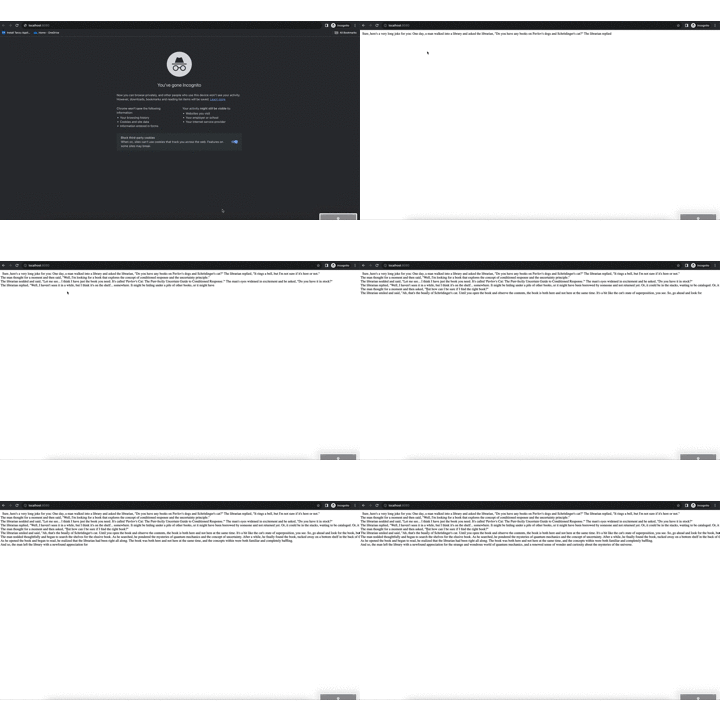
I improved the code so that accessing localhost:8080 in a browser shows the output flowing smoothly.